
Vista Social Review (2026): Pricing, Features, Pros & Cons

This article may contain affiliate links. We may earn a commission at no extra cost to you. How we earn money

In this article
This article contains affiliate links. We may earn a commission at no extra cost to you. See our affiliate disclosure.
Quick answer: Vista Social is a strong all-in-one social media tool for online stores that want scheduling, a shared inbox, review monitoring and comment-to-DM automation in one place. Plans start at $99 per month ($950 billed yearly) for 15 profiles and 2 users. It lists no Shopify integration, so skip it if all you need is basic scheduling.
If you run an online store, social media is a daily job that never quite ends. You post product photos, answer “is this still in stock?” comments, reply to DMs, watch reviews and try to work out which posts actually sent traffic to your shop. Vista Social is built to put all of that in one dashboard. This review covers what it does, what it costs in October 2026, where it falls short for Shopify and other ecommerce sellers, and who should pick something else.
One note on method before we start. This review is based on Vista Social’s own public pages, its published pricing, competitor pricing pages and third-party review sites, all checked in October 2026. We did not run a hands-on trial for this article, so we describe what the product lists and what reviewers report, and we say so where something could not be confirmed.
Vista Social at a glance
| Item | What Vista Social lists (October 2026) |
|---|---|
| Best for | Small and mid-size brands and agencies that want publishing, inbox, reviews and reporting in one tool |
| Starting price | $99 per month, or $950 per year (20% off yearly billing) |
| Free plan | None. 14-day free trial, no credit card required |
| Included at entry level | 15 social profiles, 2 users, 1,000 AI credits per month, 10,000 DM automation contacts |
| Networks | Facebook, Instagram, LinkedIn, X, Threads, TikTok, YouTube, Pinterest, Snapchat, Reddit, Bluesky, Tumblr, Google Business Profile |
| Store-friendly extras | Instagram Shop product tagging, comment-to-DM automation, review monitoring, Vista Page link in bio |
| Main gap for stores | No Shopify integration listed, no automatic posting from a product catalog |
Want to see the plans and try it yourself? You can check Vista Social’s current pricing and start the 14-day free trial without entering a card.
What is Vista Social?
Vista Social is a social media management platform. It lets you connect your brand’s social profiles, schedule and publish posts, answer comments and messages from one inbox, monitor reviews, build a link-in-bio page and pull performance reports. The company describes it as an “AI-powered command center for social media” and says it is used by brands and agencies in fields such as education, hospitality, fashion and tech. On its Pinterest page it claims more than 30,000 brands and agencies use it.
It competes with Hootsuite, Sprout Social, Buffer, Later and Metricool. The usual pitch is more features per dollar than the older enterprise tools. That pitch is worth testing against your own needs, because the way Vista charges (a flat price for a bundle of profiles and users) works very differently from tools that charge per channel or per seat.
Vista Social features that matter to online stores
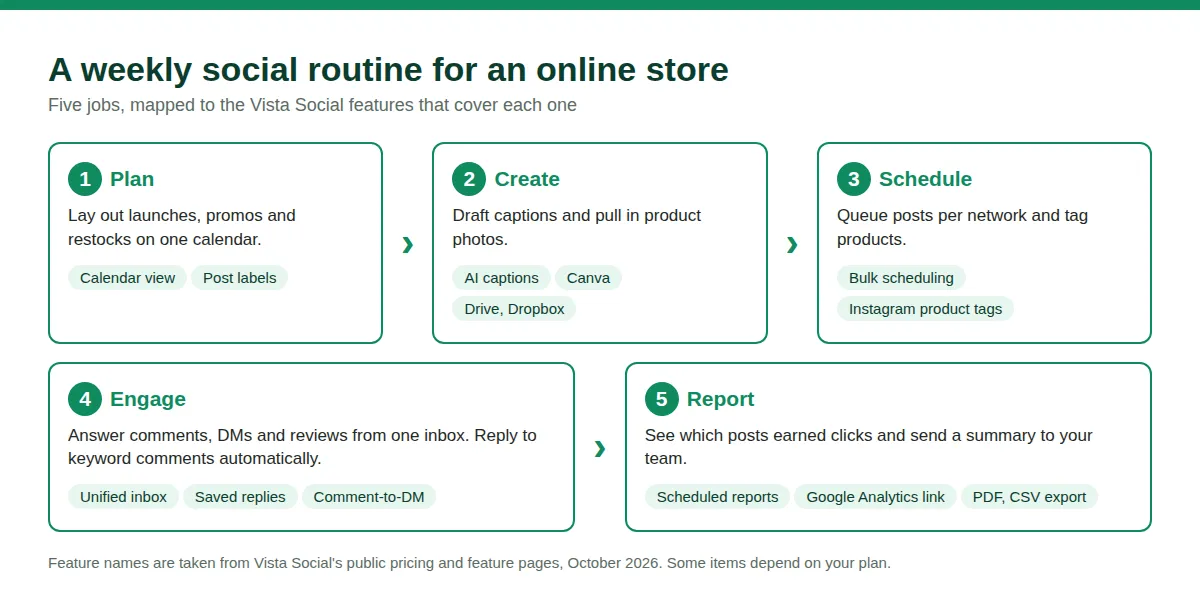
Most feature lists are written for agencies. Here is the same feature set sorted by what an ecommerce owner actually does each week.
Scheduling, calendar and bulk publishing
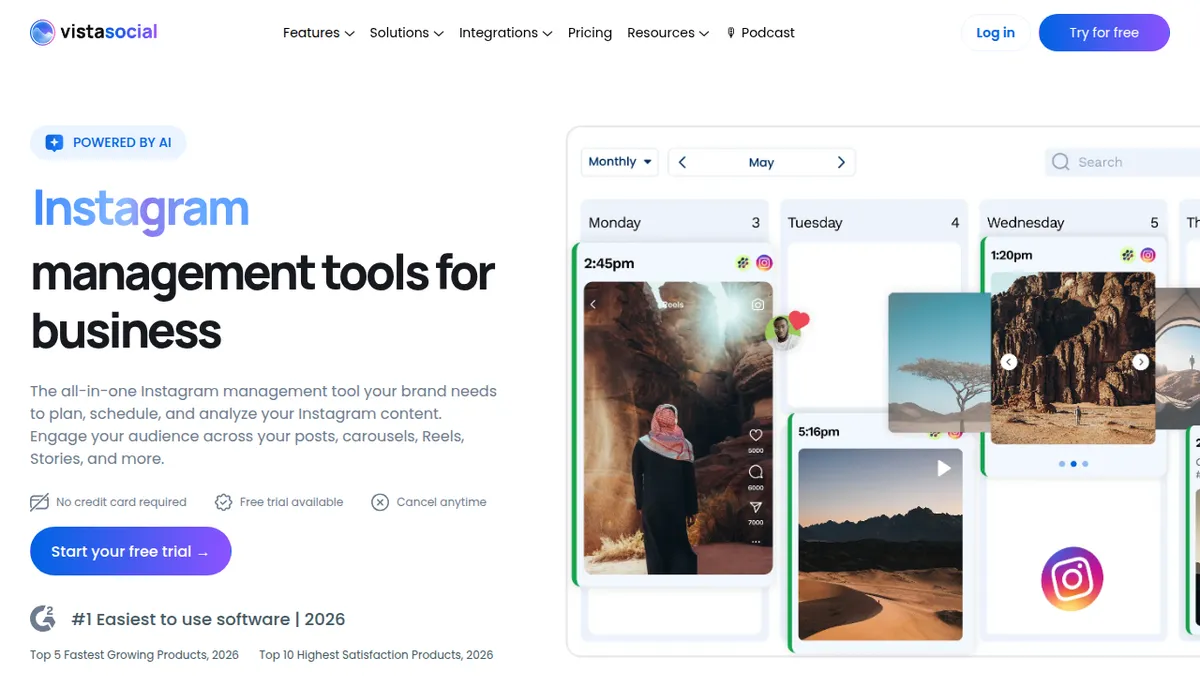
The core of the product is a visual content calendar. According to the pricing page, every plan includes unlimited post scheduling, a calendar view, a media library, draft posts, post labeling, per-profile customization of the same post, hashtag suggestions, optimal time recommendations and bulk scheduling. Canva, Google Drive, Dropbox and OneDrive connect directly, which helps when your product photos live in a shared folder. Giphy, Pexels and Unsplash are also listed on the integrations page.
For a store, bulk scheduling is the feature to look at first. A launch week or a holiday sale often means 20 to 30 posts across several networks. Being able to queue them in one sitting is the difference between a calm week and a stressful one. If you are planning for the holiday rush, our list of Christmas marketing ideas for small businesses gives you content angles to fill that calendar.
Instagram, TikTok and Pinterest, the networks stores care about
Vista Social’s Instagram page lists feed posts, Reels, Stories and carousels of up to 20 photos or videos. It also lists “tag products from Instagram Shops directly to your image, Reel, and carousel posts,” plus up to five first comments per post and hashtag suggestions. You still need an Instagram shop and catalog set up through Meta for tagging to work, so treat this as a publishing convenience rather than a replacement for that setup.
On TikTok, the product page lists video and carousel scheduling (carousels up to 10 images), a trending audio library, bulk scheduling from a video library, comment management in the inbox and CSV or PDF report exports. It does not mention TikTok Shop on that page. If you sell through TikTok Shop, read our guide to TikTok Shop vs Shopify and our walkthrough on how to sync Shopify products to TikTok Shop, because that part of the job happens outside Vista Social.
Pinterest is supported too, with pin scheduling, multiple profiles, pin boosting and metrics such as impressions, saves and clicks. Pinterest sends steady, long-lived traffic to product pages, so having it in the same calendar as Instagram is useful for stores with strong visuals.
One inbox for comments, DMs and reviews
Vista Social’s unified inbox pulls comments, direct messages and reviews into one stream. The plan table lists saved replies, message labels, internal notes, spam management and task management. For a store, this is where time gets saved. Instead of opening four apps to answer “does this come in blue?” and “where is my order?”, you answer from one screen and hand tricky ones to a teammate with a note.
Review monitoring is included, but the coverage depends on the plan. Per the pricing page, Professional covers Facebook and Google Business Profile reviews, while Advanced adds Yelp, TripAdvisor, OpenTable, Trustpilot, the App Store and Google Play. Trustpilot is the one many online stores care about. Note what is not on the list: product review platforms such as Judge.me, Yotpo or Loox. Those live inside your store, not in Vista Social.
Comment-to-DM automation
DM Automations is one of Vista Social’s more distinctive features. The product page explains the flow: someone comments a keyword on a post or Reel, and Vista Social sends them a DM automatically. The page lists Instagram, Facebook and TikTok as supported and says the tool is an approved application on Meta and TikTok. Plans include 10,000 contacts on Professional, 25,000 on Advanced and 100,000 on Scale.
A store can use this for “comment SHOP to get the link,” early access to a drop, a discount code for new followers or a size guide. Keep messages useful and short so it does not feel spammy. Our post on tactics to boost customer engagement has more ideas for keeping automated touches human.
Vista Page, a link in bio you can sell from
Vista Page is Vista Social’s link-in-bio and landing page builder. Its page lists custom domains, Typeform and Calendly embeds, PayPal and Stripe payment options, click and view tracking and a Google Analytics connection. The page says there is no limit on the number of Vista Pages you create. Per the pricing page, custom domains and Google Tag Manager support are listed with the Advanced plan.
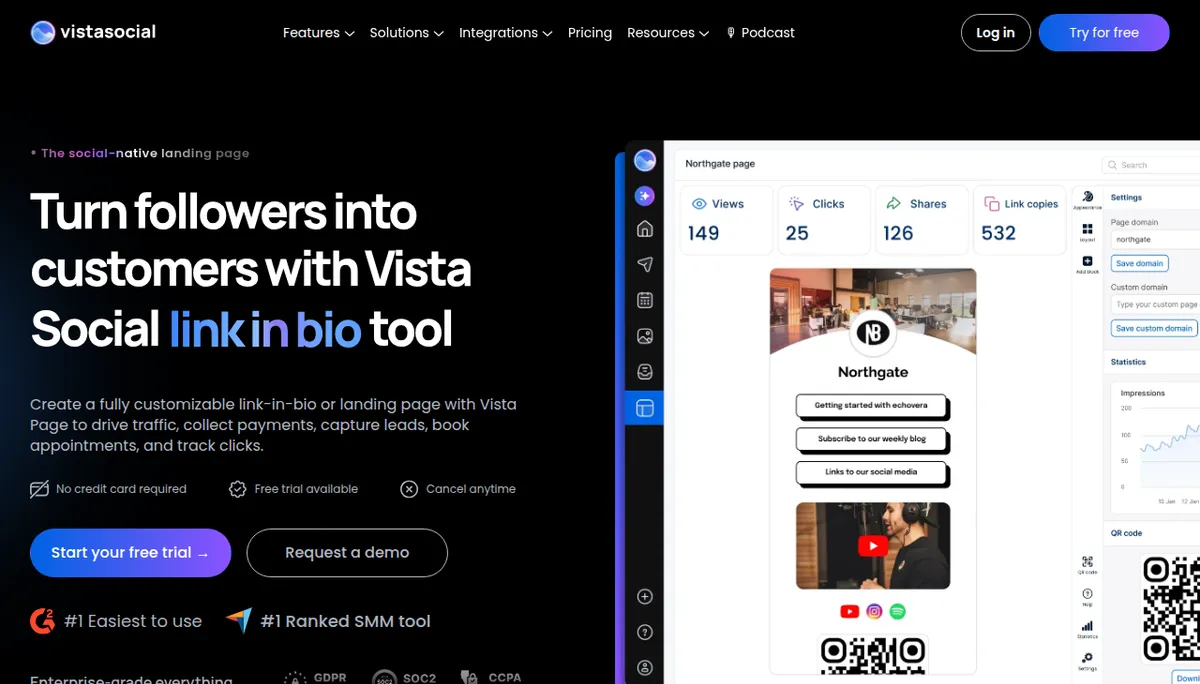
For a small shop, this can replace a separate link-in-bio subscription. It will not replace your Shopify storefront, so use it to send traffic to collections, a launch page or a “shop the post” hub.
Analytics and reporting
Every plan includes social media reports, post performance reports, downloadable reports, web analytics reports, review reports, competitor reports and scheduled reports. Advanced adds custom reports, and Looker Studio and Google Analytics connections are listed among its integrations. The Google Analytics link is the one to set up first if you care about sales. It shows how social content affects visits to your site, which feeds the question every store owner asks: which posts bring buyers, not just likes? For the bigger picture on traffic, see our guide to ways to drive traffic to your Shopify store.
AI tools and MCP
AI credits are part of every plan: 1,000 per month on Professional, 2,000 on Advanced, 3,500 on Scale and unlimited on Enterprise. They cover caption generation and reply suggestions. Higher plans add “AI Knowledge,” where you train the tool on your brand and website so replies stay on brand. Through MCP it can also connect to AI tools such as Claude Desktop, ChatGPT and Cursor. These are newer features, so check them during a trial before you build a workflow on them.
Does Vista Social work with Shopify?
This is the question the other reviews skip. We searched the integrations and pricing pages for any mention of Shopify and found none. The integrations list covers social networks, review sites, Looker Studio, Zendesk, Bitly, Google Analytics, Canva, cloud storage, Zapier, Make, Slack and Vista Page. That means no native Shopify connection and no automatic posting from your product catalog.
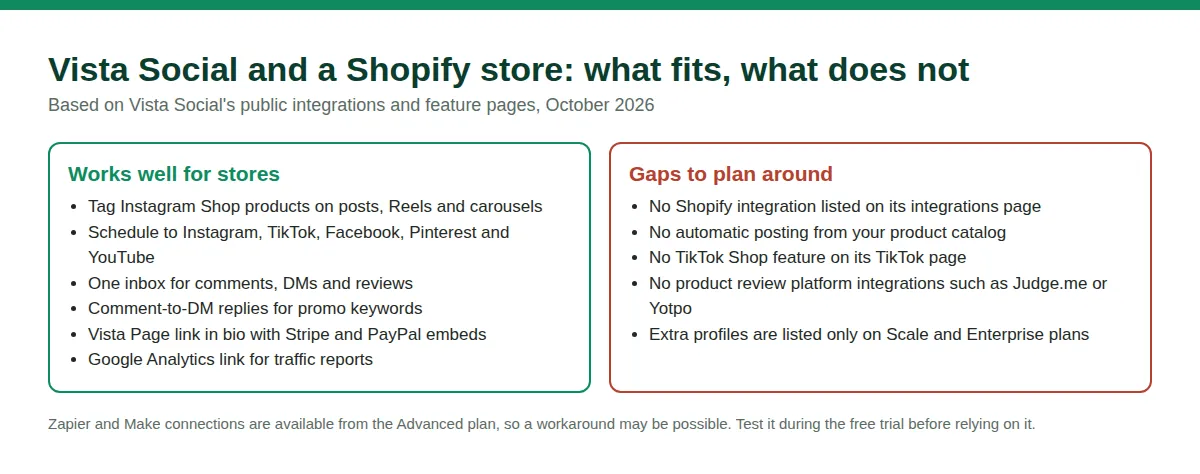
What you can do is use Vista Social as your social operations hub and handle the Shopify side separately. Zapier and Make are available from the Advanced plan, so a custom automation between Shopify and Vista Social may be possible, but we could not verify a ready-made recipe, so test it during the trial. If automatic product posting is your top need, apps built for the Shopify App Store are the more direct route. If you also run paid social, our guide to running TikTok ads for Shopify covers the ad side, which Vista Social does not manage on TikTok.
Vista Social pricing in October 2026
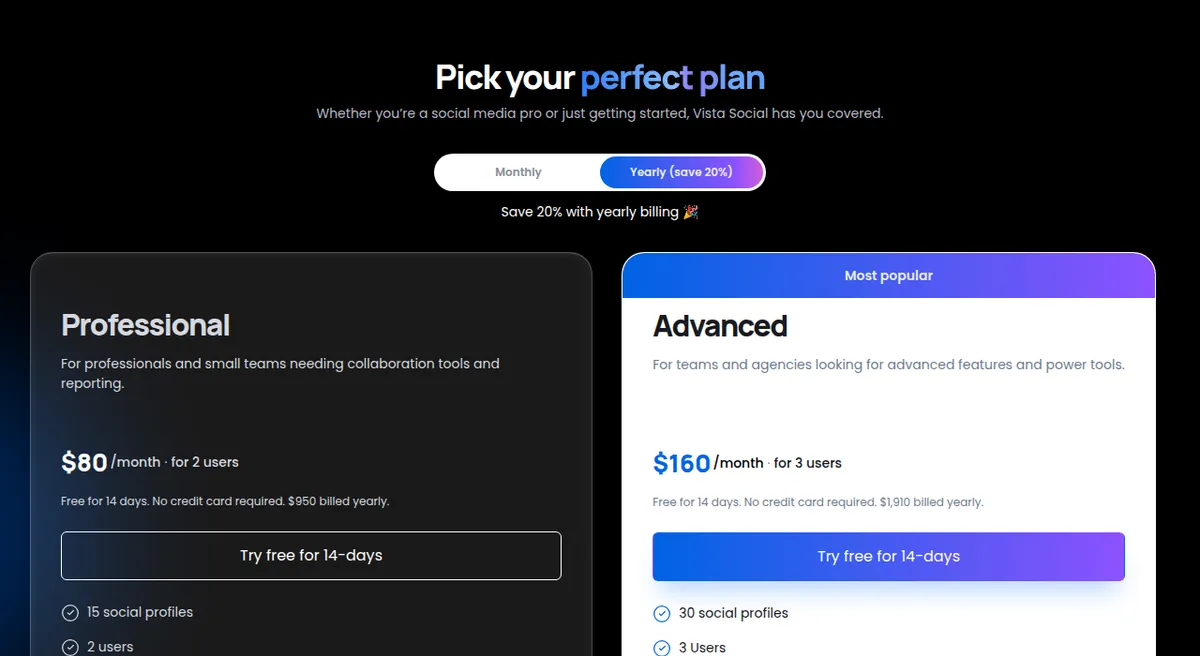
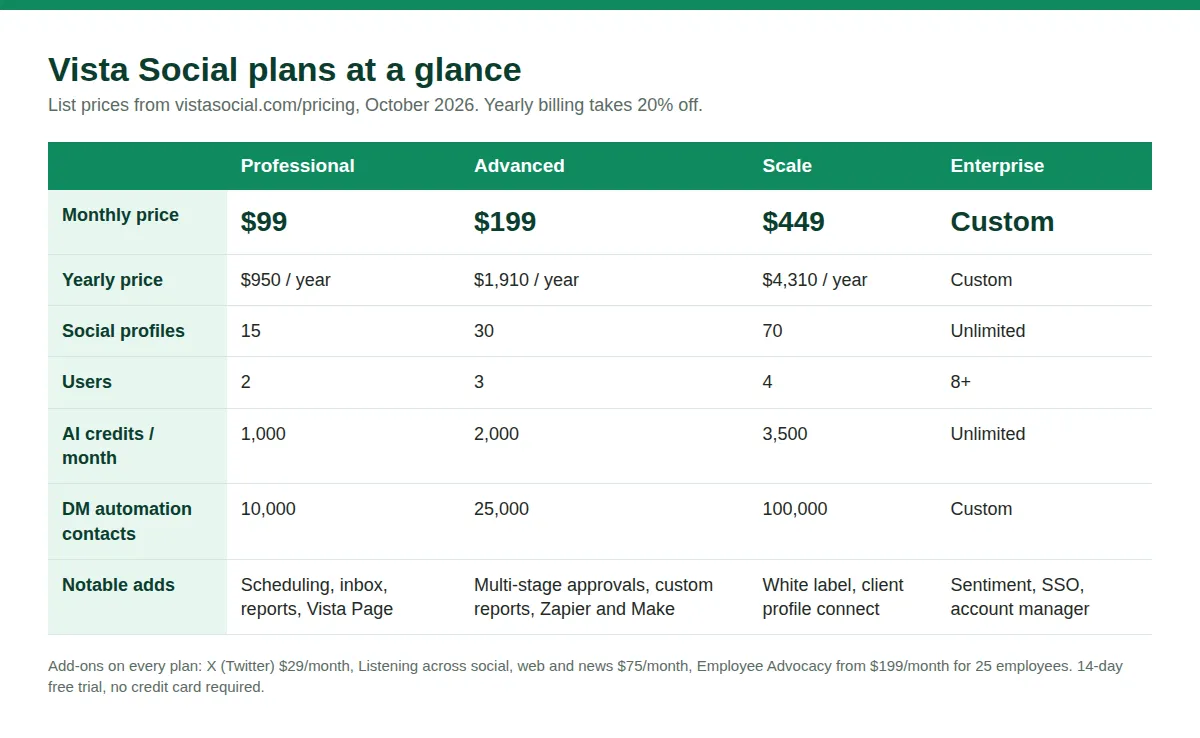
Pricing is where this review differs most from older ones. Several third-party reviews still list plans at $39, $79 and $149, and one roundup published in September 2026 still quoted those figures. Vista Social’s own pricing page now lists the plans below, so check the date on any review you read.
| Plan | Monthly | Yearly | Profiles | Users | Who it suits |
|---|---|---|---|---|---|
| Professional | $99 | $950 | 15 | 2 | Small shops and solo marketers |
| Advanced | $199 | $1,910 | 30 | 3 | Growing brands with approval needs |
| Scale | $449 | $4,310 | 70 | 4 | Agencies, multi-brand sellers |
| Enterprise | Custom | Custom | Unlimited | 8+ | Large organizations |
What each plan adds
- Professional: scheduling, inbox, reports, listening on your own profiles, Vista Page, DM automations, single-stage approval workflows, review monitoring for Facebook and Google Business.
- Advanced: multi-stage approval workflows, custom reports, Zapier and Make, advanced DM automations, custom Vista Page domains and AI training on your brand knowledge, plus the wider list of review sites.
- Scale: white-label reports and dashboard, client profile connect, more AI credits and contacts, and premium AI training with escalations and Zendesk integration.
- Enterprise: unlimited profiles, sentiment detection, premium analytics, SSO, a dedicated account manager and quarterly reviews.
Add-ons and pricing gotchas
- X (Twitter): $29 per month for publishing, boosting, automations and analytics.
- Listening: free for your own profiles, $75 per month to listen across social, web and news.
- Employee Advocacy: free for three advocates, from $199 per month for 25 employees.
- Extra profiles and users: the plan table lists them as customizable only on Scale and Enterprise. A third-party review argues you must jump to the next tier to add even one profile on lower plans. Confirm this with Vista Social if you are close to a limit.
- Inconsistent FAQ: the FAQ at the bottom of the pricing page still says Professional includes 3 users, while the plan table says 2. Go by the plan table and confirm at checkout.
- Yearly versus monthly: $950 per year works out to about $79 per month, compared with $99 on monthly billing.
Ready to compare against your own channel count? See Vista Social’s live pricing here before you decide, since plans and limits can change.
What users say about Vista Social
Vista Social’s website shows a G2 badge for “#1 Easiest to use software” in 2026 and calls itself the “#1 Ranked SMM tool” on Capterra. Those are the company’s own claims. One third-party review roundup cites about 4.8 out of 5 on G2 from more than 1,075 reviews, though G2 itself would not load for us, so treat that number as unconfirmed.
Trustpilot tells a more mixed story. When we checked in October 2026, its Vista Social page showed 78 reviews, with about 79% five-star and 17% one-star. It also carried a notice that the company’s score was unavailable because of a guideline breach and that fake reviews had been removed. The one-star complaints mention lifetime-deal subscription changes (an AppSumo purchase that lost X access), high prices compared with some rivals and billing increases without notice. Positive reviews praise having everything in one place and the support team.
The takeaway is practical. Reviewers like the breadth and the support, while complaints cluster around pricing and plan changes. Read the current plan limits carefully, and if you are on a lifetime deal, expect rules to differ from standard plans.
Vista Social pros and cons
Pros
- Scheduling, inbox, review monitoring, link in bio, DM automation and reporting in one tool.
- Flat plan pricing that covers 15 profiles and 2 users at the entry level, instead of per-channel or per-seat billing.
- Instagram Shop product tagging on posts, Reels and carousels.
- Wide network coverage, including Pinterest, TikTok, Threads, Snapchat, Reddit and Bluesky.
- Comment-to-DM automation across Instagram, Facebook and TikTok.
- 14-day free trial with no credit card required.
Cons
- No free plan, and $99 per month is a lot for a store that only posts to three or four channels.
- No Shopify integration listed, and no auto-posting from a product catalog.
- Several useful features sit on Advanced at $199 per month, including multi-stage approvals, custom reports and Zapier.
- Extra profiles appear to be available only on higher plans.
- Some pricing details on the site conflict with each other, and older third-party reviews quote outdated prices.
- Mixed Trustpilot signals around billing changes and a profile notice about removed fake reviews.
Who should use Vista Social?
It fits if you
- Manage five or more social profiles for one or several stores and want one flat bill.
- Get a steady flow of Instagram and TikTok comments and DMs that need fast answers.
- Want comment-to-DM promos and a link-in-bio page without paying for separate tools.
- Work with a freelancer or teammate and need approvals, notes and shared access.
- Care about monitoring Trustpilot, Google or app store reviews next to social comments.
Look elsewhere if you
- Post to three channels or fewer and mostly need a queue. Buffer’s free plan or a small paid plan costs far less.
- Want products auto-posted from your Shopify catalog.
- Need deep enterprise listening or large teams with per-seat controls, where Sprout Social or Hootsuite are the usual picks.
- Prefer to pay per brand rather than per bundle, where Metricool’s model may be cheaper.
Vista Social vs alternatives for ecommerce
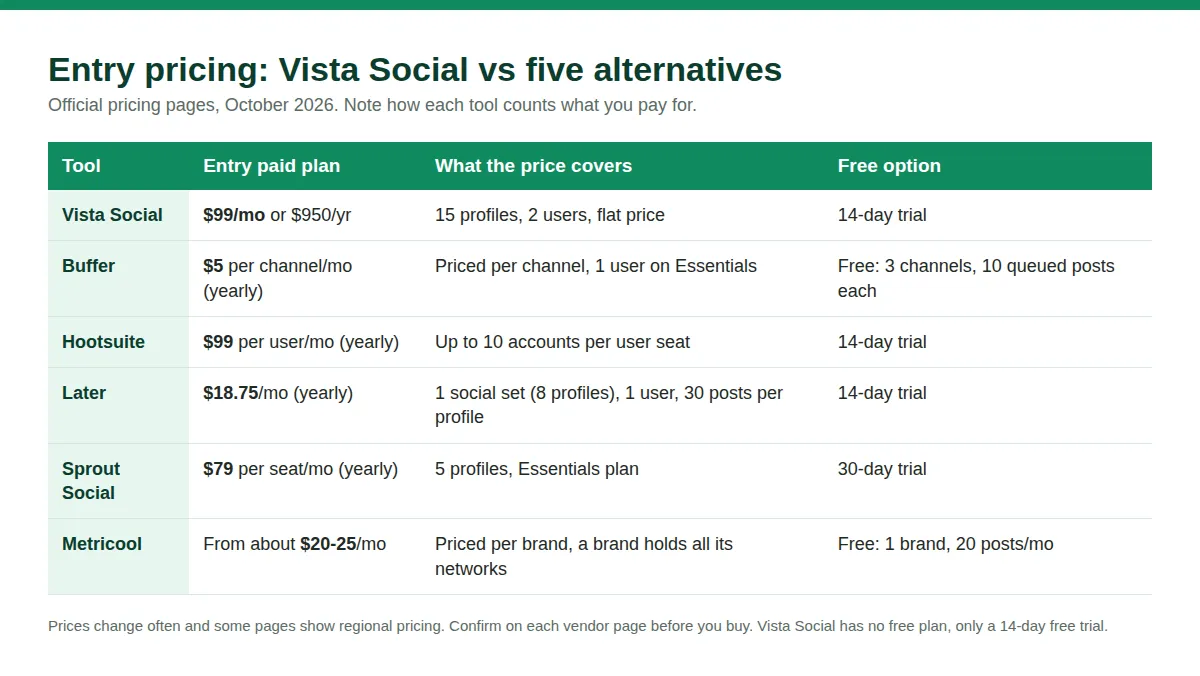
Price is only part of the story, because each tool counts what you pay for differently. Here is how the main alternatives look on their official pricing pages in October 2026.
- Buffer: a free plan with 3 channels and 10 scheduled posts per channel. Paid plans are priced per channel, starting at $5 per channel per month on Essentials (billed yearly) and $10 on Team. A store with four channels would pay roughly $20 per month for scheduling. Buffer is simpler, with fewer inbox and automation features.
- Hootsuite: Standard at $99 per user per month billed annually (up to 10 accounts), Professional at $199 and Advanced at $399. Powerful, but per-user pricing climbs as your team grows.
- Later: Starter at $18.75 per month billed yearly for one social set (8 profiles) and one user, with 30 posts per profile each month. Growth at $37.50 adds approvals and a social inbox. Strong for visual planning, with post limits to watch.
- Sprout Social: Essentials at $79 per seat per month (billed annually) for 5 profiles, then Standard at $199, Professional at $299 and Advanced at $399 per seat. A deep tool built for larger teams.
- Metricool: a free plan for one brand with 20 posts per month, then paid plans priced by number of brands. Because a brand holds all of its networks, a single store can be inexpensive here.
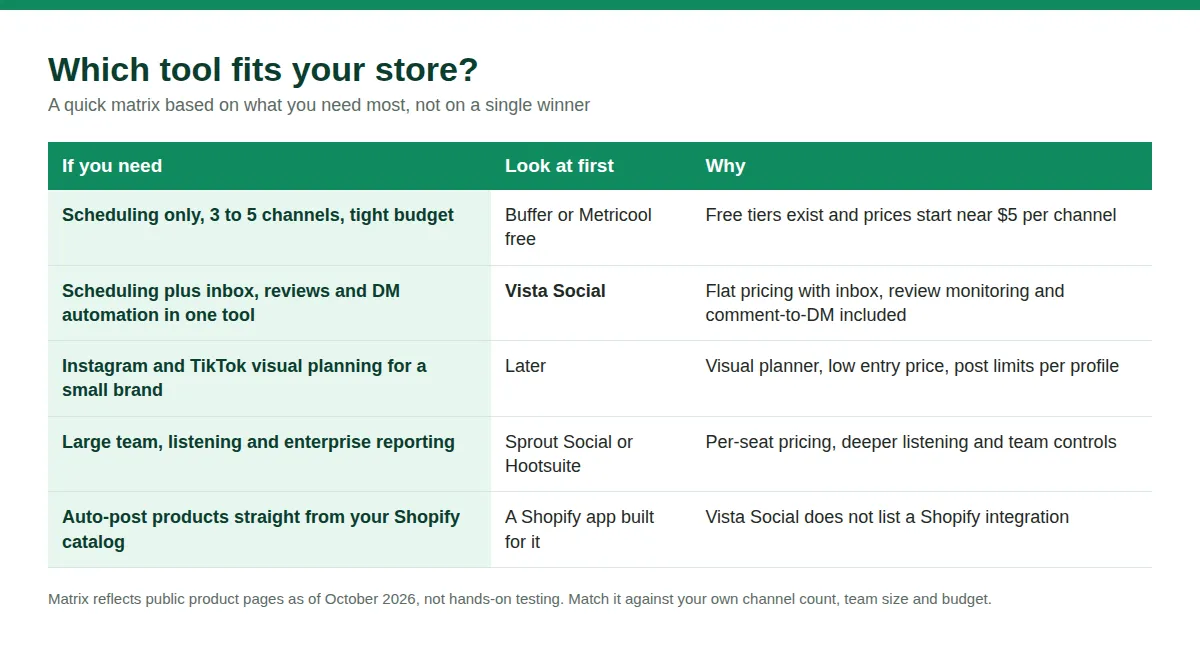
The honest summary is that Vista Social wins when you need many features and several profiles under one flat price, and loses when your needs are small. A single store with four channels and one user is likely better served by a cheaper scheduler. A store with five or more profiles, a busy inbox and a part-time helper gets more from the bundle.
Tips to get more from social media as a store owner
- Pick two or three networks first. Stores that spread thin across eight networks get shallow results. Our guide on how to market a product online shows how to focus.
- Tie posts to a goal. Link every post to a product, a collection or an email signup, and track the clicks with the Google Analytics connection.
- Use automation for the repeat questions. Shipping times, sizing and discount codes are ideal for saved replies and comment-to-DM flows.
- Batch your week. Block one session to create and schedule posts, and a short daily slot to clear the inbox. Organic social also works best alongside other free channels, as we cover in how to attract customers without spending on ads.
Vista Social review FAQ
How much does Vista Social cost?
As of October 2026, Vista Social lists Professional at $99 per month ($950 per year), Advanced at $199 per month ($1,910 per year), Scale at $449 per month ($4,310 per year) and custom Enterprise pricing. Add-ons such as X publishing ($29 per month) and social listening ($75 per month) cost extra. Older reviews may quote lower prices that are no longer current.
Is there a free plan or free trial?
There is no free plan. Vista Social offers a 14-day free trial with no credit card required, and you can subscribe to a monthly or yearly plan during or after the trial.
Does Vista Social integrate with Shopify?
Not natively, based on its integrations and pricing pages in October 2026. You can use it alongside Shopify for social publishing and engagement, and Zapier or Make (from the Advanced plan) may help connect the two. Test any automation during the trial first.
Which social networks does Vista Social support?
Its integrations page lists Facebook, Instagram, LinkedIn, X, Threads, TikTok, YouTube, Pinterest, Snapchat, Reddit, Bluesky, Tumblr and Google Business Profile, plus review sites such as Trustpilot, Yelp and TripAdvisor.
Can Vista Social tag products on Instagram?
Yes. Its Instagram page says you can tag products from Instagram Shops on images, Reels and carousel posts. You need an Instagram shop set up through Meta first.
Is Vista Social better than Hootsuite or Buffer?
It depends on your needs. Vista Social bundles inbox, reviews, DM automation and reports at a flat price, so it can beat per-seat tools for busy stores with several profiles. Buffer is cheaper and simpler for basic scheduling, and Hootsuite or Sprout Social suit larger teams. Use the chooser above to match the tool to the job.
Is Vista Social good for small online stores?
It can be, if you manage several profiles and need an inbox and automation. For a very small store posting to two or three channels, the $99 starting price may be more than you need, and a free or low-cost scheduler is a better first step.
Does Vista Social have a mobile app?
Yes. Vista Social offers iOS and Android apps for publishing, the inbox, approvals and product tagging.
Final verdict
Vista Social is a capable and fairly priced platform for online stores that treat social media as a real channel. Its best features for ecommerce are the unified inbox, review monitoring, Instagram Shop tagging, comment-to-DM automation and flat pricing across many profiles. Its weak spots are the lack of a free plan, the absence of a Shopify integration and a few pricing details that need confirming.
If you manage five or more profiles, answer many comments and DMs and want one bill, it is worth a 14-day trial. If you only need a posting queue for a few channels, start with a cheaper tool and upgrade later. Either way, you can try Vista Social free for 14 days and judge the inbox and calendar for yourself before paying anything.
Sources
- Vista Social pricing: vistasocial.com/pricing
- Vista Social integrations: vistasocial.com/integrations
- Vista Social Instagram tools: vistasocial.com/integrations/instagram
- Vista Social TikTok tools: vistasocial.com/integrations/tiktok
- Vista Social Pinterest tools: vistasocial.com/integrations/pinterest
- Vista Social DM automations: vistasocial.com/dm-automations
- Vista Page link in bio: vistasocial.com/vista-page
- Vista Social mobile apps: vistasocial.com/mobile
- Buffer pricing: buffer.com/pricing
- Hootsuite plans: hootsuite.com/plans
- Later pricing: later.com/pricing
- Sprout Social pricing: sproutsocial.com/pricing
- Metricool pricing: metricool.com/pricing
- Trustpilot, Vista Social reviews: trustpilot.com/review/vistasocial.com
- Third-party pricing commentary: Authencio, Vista Social pricing
Prices and features checked in October 2026 and can change. Confirm current details on each vendor’s website before you buy.


