
This page contains affiliate links. See our affiliate disclosure.
Quick answer: To do SEO on Shopify, verify your store in Google Search Console and submit sitemap.xml, choose one target keyword per page, write unique titles (about 60 characters) and meta descriptions (about 160), add descriptive image alt text, fix duplicate URLs and slow pages, keep structured data valid, build useful collection and blog content, and review Search Console every month.
Shopify handles a lot of technical SEO for you. It generates your sitemap.xml and robots.txt, adds canonical tags, turns on SSL and ships themes with product structured data. It cannot choose your keywords, write pages worth ranking, or keep your store fast after you install twelve apps. That part is a checklist, and this is the one we use when we audit a new store.
Work through it in order: measurement, keywords, technical fixes, on-page work, content and links, then AI search and maintenance. Each task says what to do and where to click in Shopify admin. Anything that can change is marked "as of October 2026," and where our sources did not confirm something, we say so.
How search engines see a Shopify store
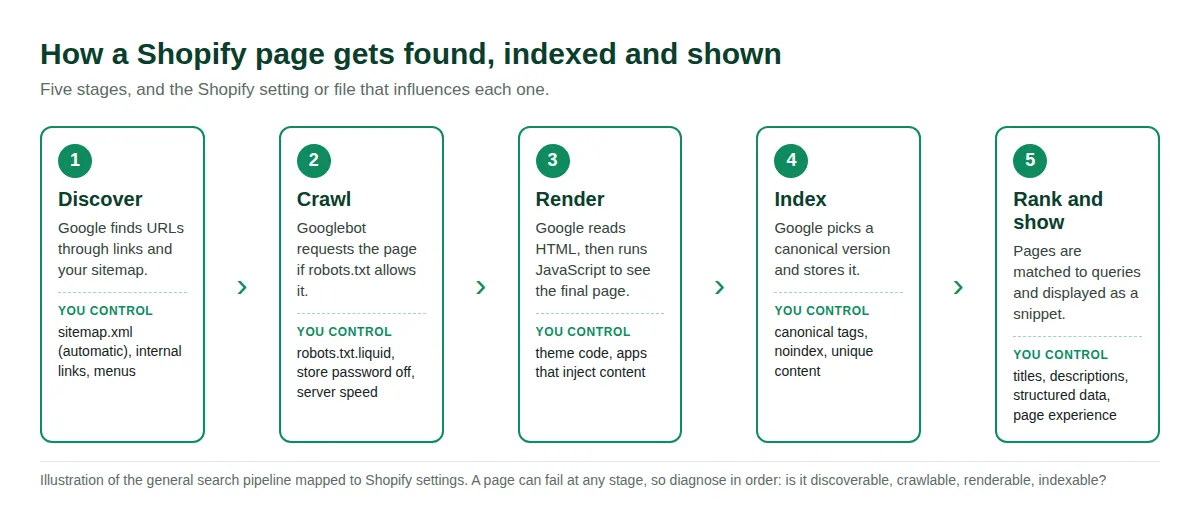
Every page passes through discovery, crawling, rendering, indexing and ranking. A page can fail at any stage, so diagnose in order: is it linked and in the sitemap, is it allowed by robots.txt, does it render its main content, and is Google choosing it as the canonical version?
Shopify SEO priorities at a glance
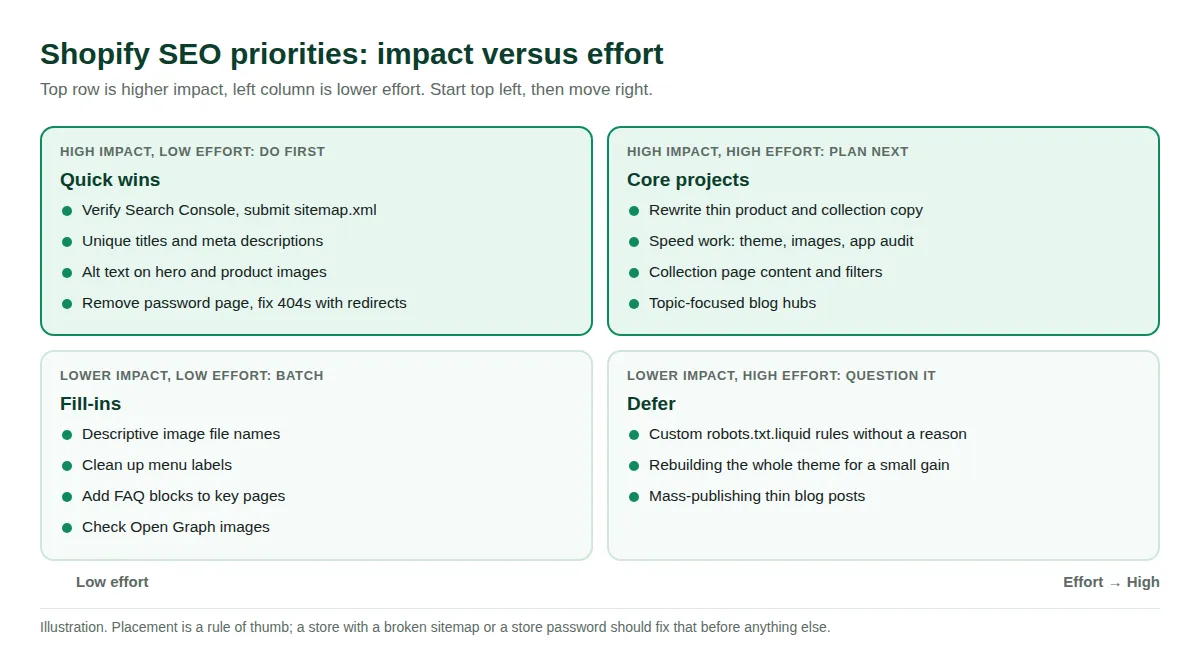
With only a weekend, do the high-impact, low-effort items first. The ranking below is our judgment from auditing stores, not a Google formula.
| Task | Impact | Effort | When |
|---|---|---|---|
| Remove store password, verify Search Console, submit sitemap.xml | Critical | Low | Day 1 |
| Unique titles and meta descriptions on top pages | High | Low | Week 1 |
| Redirect 404s and old URLs | High | Low | Week 1 |
| Speed and Core Web Vitals | High | Medium to high | Weeks 2 to 4 |
| Rewrite thin product and collection copy | High | High | Weeks 2 to 6 |
| Blog content and internal links | High over time | High | Monthly |
| Custom robots.txt.liquid rules | Rarely needed | Medium, risky | Only with a reason |
1. Set up measurement: Search Console, sitemap.xml and GA4
- Turn off the storefront password: A store in private mode is not indexed, and Shopify notes Google Analytics cannot track events until private mode is off. Shopify also says trial accounts are not indexed. Clear the password under Online Store > Preferences.
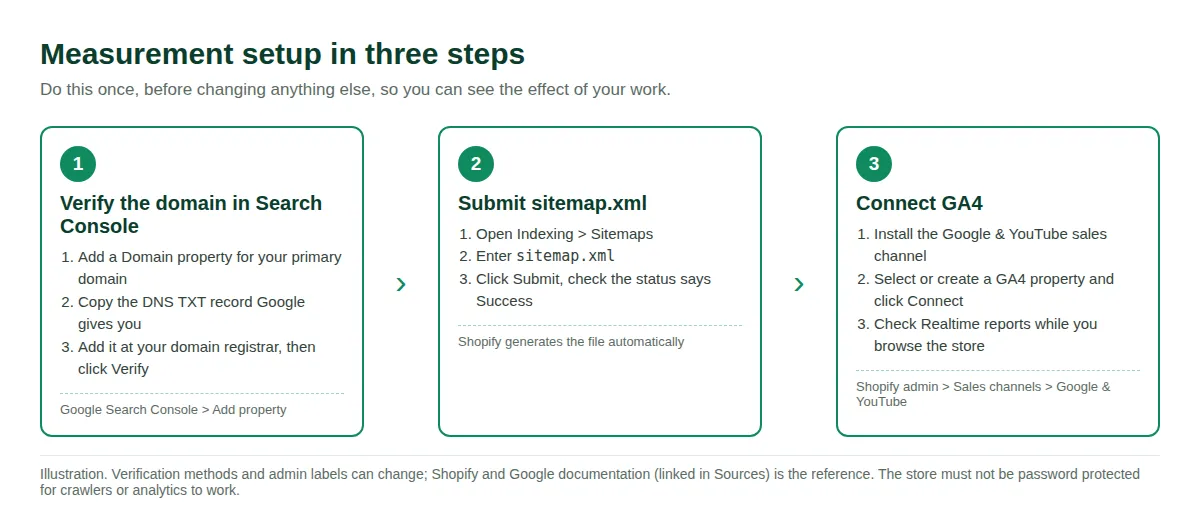
- Verify your domain in Google Search Console: Add a Domain property and create the DNS TXT record Google gives you at your registrar. It can take minutes or occasionally days to be visible. If you cannot edit DNS, a URL-prefix property with the HTML meta tag method works.
- Submit sitemap.xml: In Search Console open Indexing > Sitemaps, enter
sitemap.xmland click Submit. Shopify generates the file at your domain root as an index linking to product, collection, blog and page sitemaps, and updates it automatically. With international domains on a Basic plan or higher, each domain has its own sitemap to submit. - Connect GA4: Install the Google & YouTube sales channel, open Sales channels > Google & YouTube, pick or create a GA4 property and click Connect. Shopify says you do not need a Merchant Center account for this. Check the Realtime report while you browse your store.
- Record a baseline: Export 90 days of Search Console queries and pages, and note your Core Web Vitals status, so you can compare next month.
Shopify says Google typically indexes new or updated pages within 48 to 72 hours. That is a typical figure, not a promise, and Google describes a sitemap as a hint that does not guarantee crawling or indexing. To check a single page, use the URL Inspection tool, or run site:yourstore.com for a rough check.
2. Keyword research for Shopify stores
Keyword research decides what each page is about. The goal is a map where every important URL has one primary keyword, and no two pages compete for the same phrase.
- Start with what you already rank for: In Search Console open Performance > Search results and sort by impressions. Queries in positions 8 to 20 are your cheapest wins.
- Use free suggestion sources: Google autocomplete, "People also ask," related searches, Google Trends for seasonality, and Google Keyword Planner (free with a Google Ads account) for volume ranges.
- Match page type to intent: "Waterproof trail shoes" is a shopping query for a collection page. "How to choose trail running shoes" is informational and fits a blog post. Look at what already ranks to see which type Google wants.
- Map one keyword to one URL: Keep a sheet with URL, primary keyword, secondary keywords and current title. Check it before writing anything new, so you do not cannibalize an existing page.
- Prefer specific, buyer-ready phrases: "Wide fit waterproof hiking boots women" is easier to win and closer to purchase than "boots."
Shopify's help center says to place your most important keywords near the start of the title and use natural phrases. For more on what still works, see our guide to Shopify SEO tips.
3. Technical SEO specific to Shopify
| Handled by Shopify | Still your job |
|---|---|
| sitemap.xml generated and updated | Submit it, keep thin pages out |
| robots.txt with sensible defaults | Leave it alone without a documented reason |
| Canonical tags | Link to canonical URLs, verify with URL Inspection |
| SSL on by default | Fix redirects after domain changes |
| Title tag with store name, product schema in themes | Unique titles and descriptions, validated markup |
| hreflang when Markets are configured | Translate and localize content properly |
URL structure and duplicate URLs
Shopify uses fixed prefixes: /products/, /collections/, /pages/ and /blogs/. The handle after the prefix is editable. The main duplicate trap is that a product can also load at a collection path such as /collections/trail-shoes/products/trail-runner. Themes output a canonical tag so search engines know which version to prefer, and Shopify's SEO overview confirms canonical tags are generated automatically.
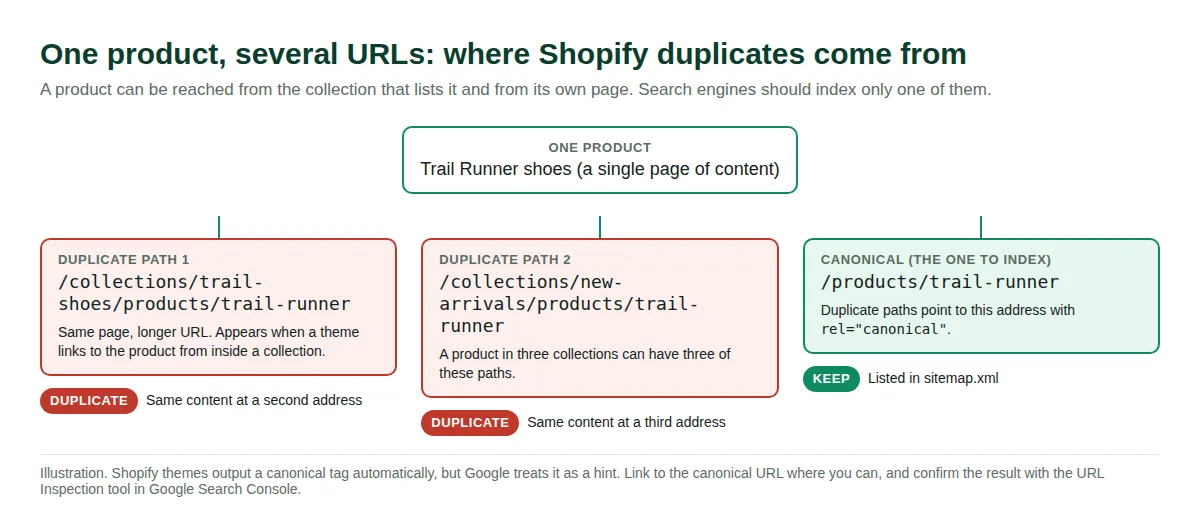
- Confirm the canonical: Open a product through a collection, view source and search for
rel="canonical". It should point to the clean/products/handleURL. URL Inspection shows which URL Google chose. Google treats canonicals as a strong hint and may choose differently. - Link to canonical URLs: Google advises linking internally to the canonical rather than a duplicate. Many themes use Liquid's
withinfilter, which produces the collection path. A developer can switch product card links to plainproduct.url. - Do not fix duplicates with robots.txt: Google warns that disallowed URLs can still be indexed without content.
- Keep handles short and stable: Shopify's help center warns that changing a handle too often can keep a product out of results. When you change one, redirect the old URL.
- Redirect deleted and renamed URLs: Go to Content > Menus > View URL Redirects (as of October 2026). Shopify only lets you redirect from URLs that return a 404, so delete or unpublish the old page first. Reserved paths such as
/cartand/orderscannot be redirected. Redirects do not apply automatically to every Markets subfolder, so add them per locale. - Discontinued products: Redirect to a close replacement or the parent collection, or keep the page with links to alternatives if it still earns traffic.
robots.txt and hiding pages
Shopify's default robots.txt blocks private and low-value paths: /admin, /cart/, /checkout, /account, /orders, and filtered or sorted collection URLs (/collections/*+*, /collections/*sort_by*). Open yourstore.com/robots.txt to see your current version.
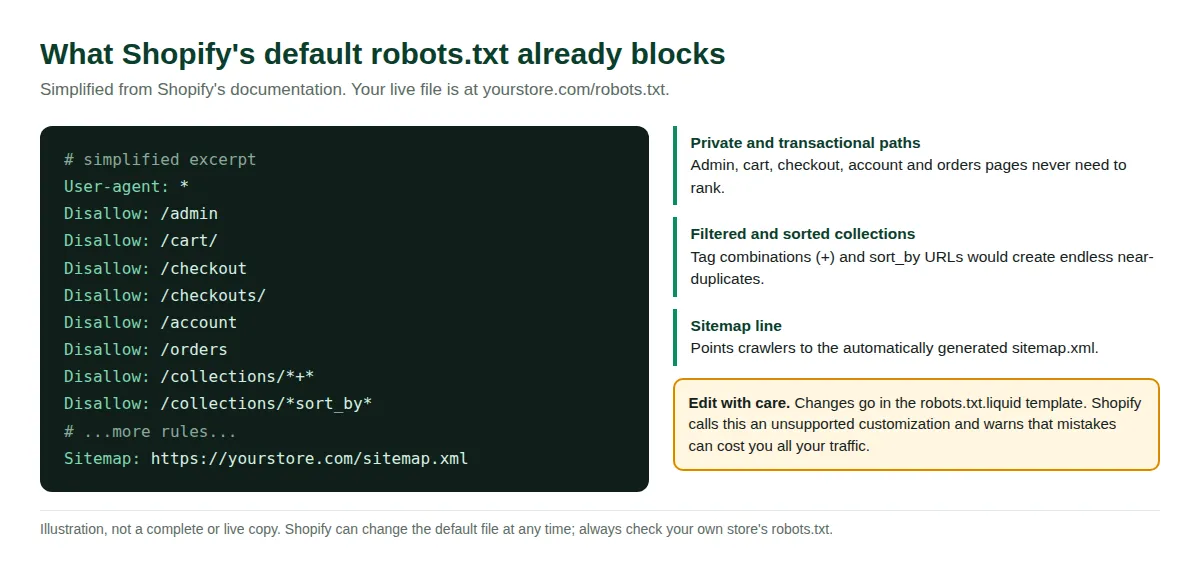
- Usually leave it alone: You can customize it with a
robots.txt.liquidtemplate (Online Store > Themes > Edit code > Add a new template > robots), but Shopify calls this unsupported and warns that mistakes can lose all traffic. If you edit, use Shopify's Liquid objects, not plain text, and compare the output with your current file first. - Hide pages the documented way: A
noindexmeta tag intheme.liquidkeeps a page out of search engines but still searchable in-store. Unlisted product status removes it from internet search, Shopify Catalog and the sitemap. Aseo.hiddenmetafield set to 1 removes content from sitemaps and search engines while it can still appear in collections. - Check after migrations: Shopify's FAQ lists missing redirects after a migration as a common cause of lost rankings.
Speed and Core Web Vitals
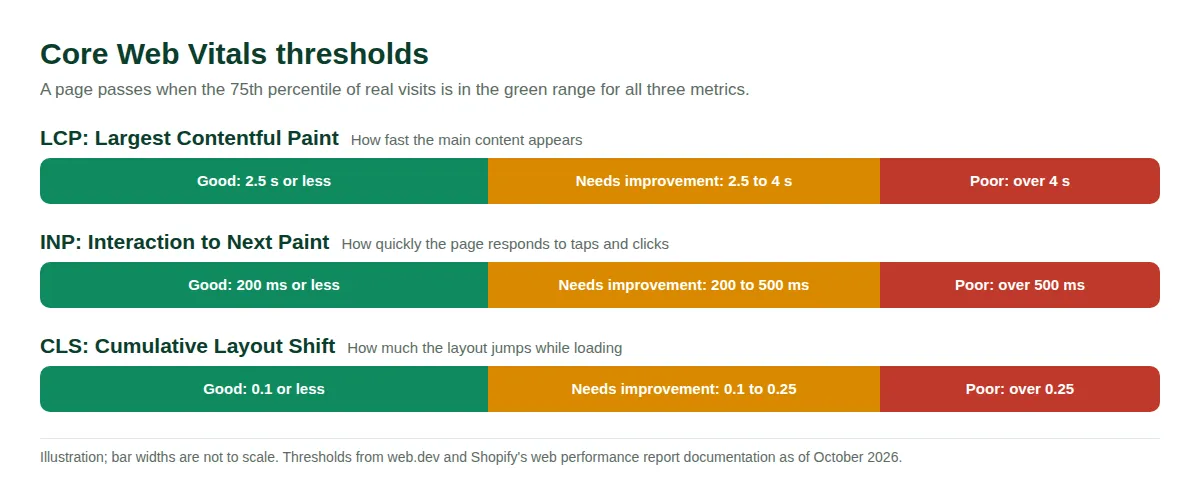
Per web.dev, the Core Web Vitals targets at the 75th percentile of real page loads are: Largest Contentful Paint (LCP) within 2.5 seconds, Interaction to Next Paint (INP) at 200 milliseconds or less, and Cumulative Layout Shift (CLS) at 0.1 or less. Speed rarely outranks great content, but a slow store loses shoppers before they read it.
- Measure field data first: Shopify's web performance report shows real-user Core Web Vitals on the Themes page or under Analytics > Reports. Data can lag up to 36 hours and covers 90 days. Shopify's developer docs advise field data to spot problems, lab tools to diagnose, then field data to confirm.
- Test three templates in PageSpeed Insights: Home page, best collection, best product. Lab scores will differ from the Shopify report, which is normal.
- Fix the LCP image: Shopify's guidance: never lazy-load the LCP image, add
fetchpriority="high", use a real<img>instead of a CSS background, and always set width and height. - Size images properly: Upload near display size. Google Search supports WebP and AVIF.
- Defer non-critical JavaScript: Render content with Liquid and HTML, defer scripts not needed for first paint, and remove unused scripts and old tracking pixels.
For hands-on fixes, see our guide to improving your Shopify speed score.
Theme and app choices
- Start from a clean theme: Free Online Store 2.0 themes have solid defaults, while heavily customized premium themes can add weight. See our review of the best Shopify themes for SEO.
- Check headings: Each page needs one H1. Shopify's FAQ says missing titles or H1s usually come from theme edits or apps, and points to
theme.liquid(titles) andmain-product.liquidormain-list-collections.liquid(H1s). - Test before you publish a theme change: Duplicate the theme, edit the copy, run PageSpeed Insights and the Rich Results Test on the preview.
- Audit apps: Many inject JavaScript on every page. Review Settings > Apps and sales channels, delete unused apps, and test speed before and after each install. Search theme code for leftover snippets after removal, since some apps leave code behind.
- Avoid duplicate markup: Two SEO tools that both output JSON-LD can conflict. Our roundup of Shopify SEO apps covers the trade-offs.
4. On-page SEO in Shopify admin
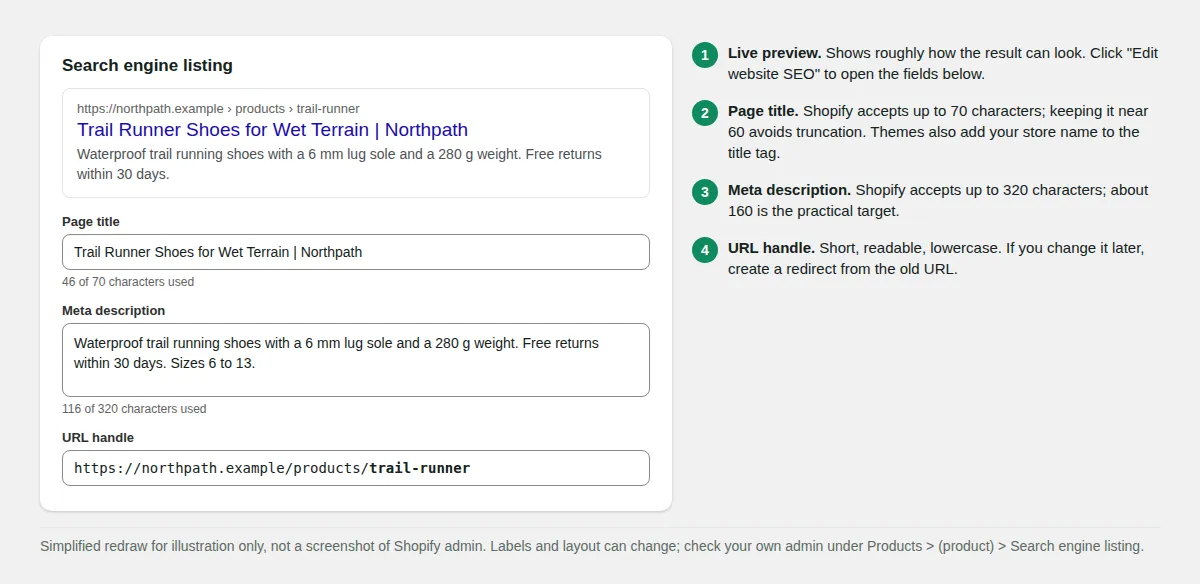
Every product, collection, page and blog post has a Search engine listing section with a page title, meta description and URL handle. Defaults are usually weak, so this is where many stores see quick gains.
| Element | Shopify field limit | Practical target | Where to edit (as of October 2026) |
|---|---|---|---|
| Page title | Up to 70 characters | About 60 | Item > Search engine listing > Edit website SEO |
| Meta description | Up to 320 characters | About 160 | Same section |
| Home page title and description | Same fields | Brand plus main category | Online Store > Preferences |
| Image alt text | Free text | One clear sentence | Product > click image > Edit alt text |
Limits and the 60 and 160 targets come from Shopify's help center. Google sets no length limit, truncates to device width, and may rewrite titles or descriptions it considers inaccurate.
Titles and meta descriptions
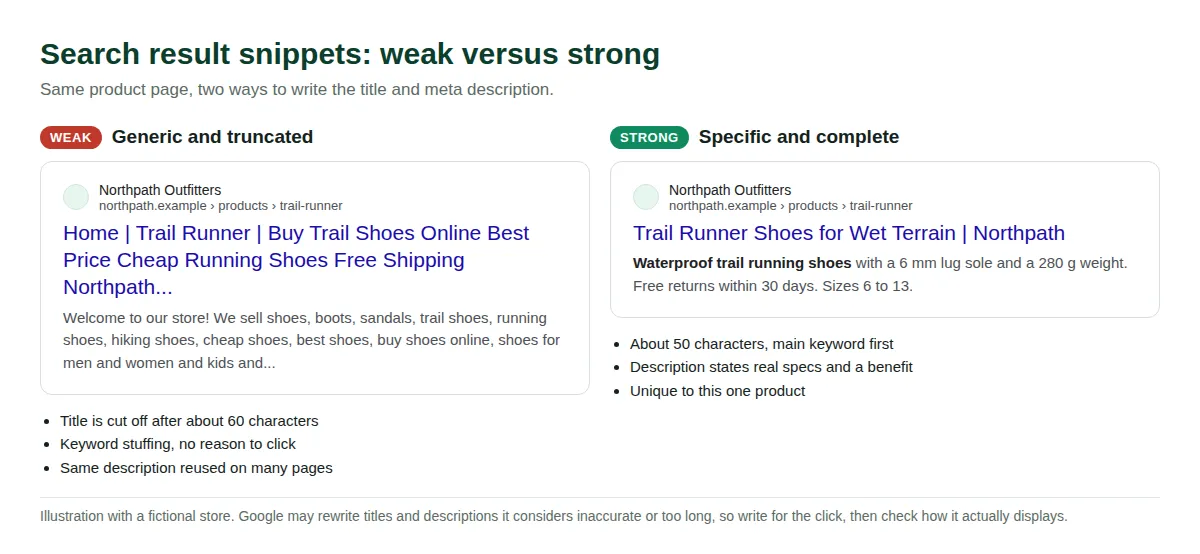
- Lead with the primary keyword: Format: "Primary keyword + differentiator | Brand," for example "Waterproof Trail Running Shoes for Wet Terrain | Northpath."
- Make every title unique: Google warns against repeated or boilerplate titles. If 200 products share "Shoes | Store," rewrite the best 20 first.
- Write descriptions that earn the click: Include concrete details such as material, sizes, returns or price. Google says keyword lists are less likely to be shown.
- Prioritize by data: In Search Console, find pages with high impressions and low click-through rate, and rewrite those first.
Headings, descriptions and alt text
- One H1 per page: The theme normally uses the item title. Use H2 and H3 for sections, and do not add a second H1 in the description editor.
- Write original descriptions: Shopify advises against copying manufacturer text. Cover who it is for, materials, dimensions, care, sizing and what is in the box.
- Do not pad for length: Shopify suggests at least 250 words of descriptive text per page and 500 for informational pages. Treat that as a floor against thin pages, not a ranking rule, since Google publishes no minimum.
- Add alt text: Products > open a product > click the image > Edit alt text > Save alt text. For collections and posts, open the item, choose the image options, then Edit image. Describe the image plainly: "Red waterproof trail running shoe, side view on wet rock." Google's guidance asks for useful, information-rich alt text, not keyword stuffing.
- Rename files before upload:
red-trail-runner-side.jpgbeatsIMG_0023.JPG. Keep key information in HTML text, not baked into banner images. - Menus: Keep key pages within 3 clicks of the home page, use descriptive menu labels, and link every page from a menu, per Shopify's site structure guidance. Edit menus under Content > Menus.
5. Structured data for products
Shopify's SEO overview says its themes automatically include product schema markup, which can enable rich results with price, reviews and availability. Shopify's structured_data Liquid filter turns a product into schema.org JSON-LD (a Product, or a ProductGroup when variants exist) and an article into an Article.
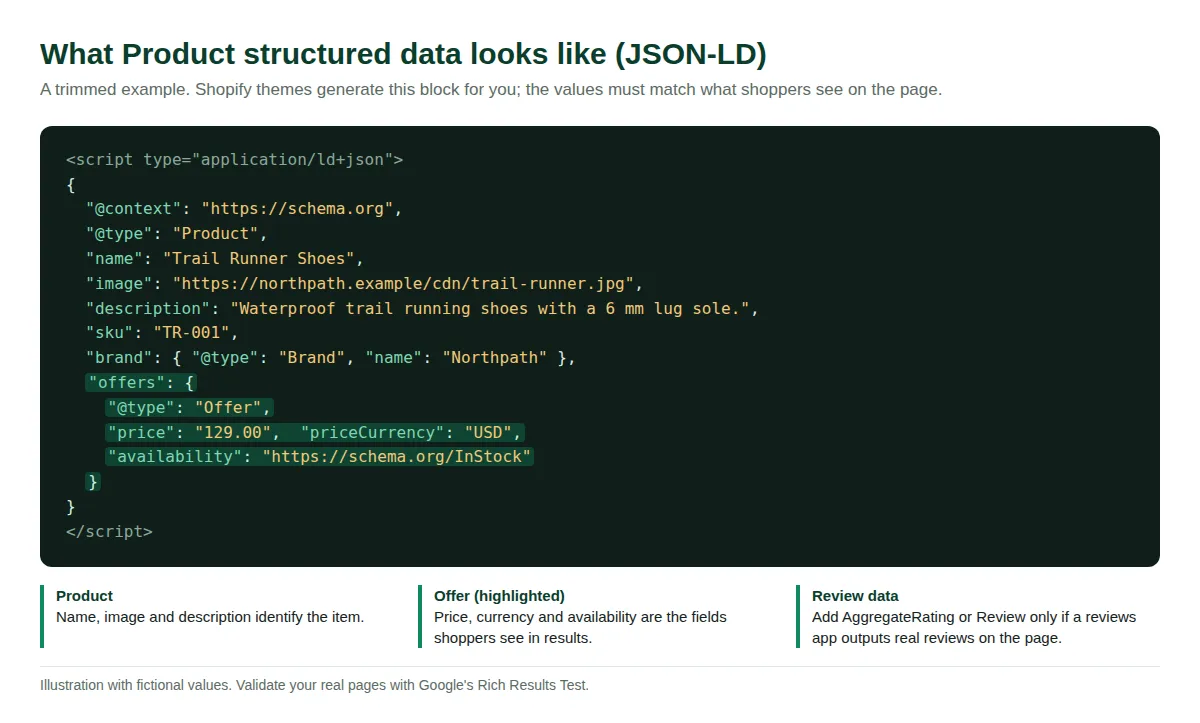
- Product: Name, image, description, SKU and brand come from your product data, so complete fields make better markup.
- Offer: Price, currency and availability must match the visible page. Google separates product snippets (pages where people cannot buy directly) from merchant listings (pages where they can). A store product page normally targets merchant listings.
- Review and AggregateRating: Add only if a reviews app outputs real, visible reviews. Check that your app and theme do not both output ratings.
- BreadcrumbList: We could not confirm that every default theme outputs it. Test your pages, and ask a developer or check your SEO app if it is missing.
- Validate on real URLs: Run Google's Rich Results Test on one product, one collection and one post. Shopify's FAQ calls checking how search engines render your pages the most reliable method.
- Merchant Center: If you sell physical goods, the Google & YouTube channel can also feed product data for free listings. That is separate from on-page markup.
6. Collection pages
Collection pages often hold the most SEO value, capturing "category plus modifier" searches near purchase. Yet most are a bare product grid with a default title.
- Give each key collection one primary keyword: Use the phrase shoppers use in the title and H1.
- Add useful intro copy: Under Products > Collections, write 100 to 300 words on who it suits and how to choose. Place helpful text where shoppers will read it.
- Customize the SEO title and description instead of the default "Collection | Store."
- Do not create collections for every tag combination: Shopify blocks filtered and tag-combination URLs in robots.txt on purpose. Make real collections for combinations people search for, and use automated collection conditions to keep them current.
- Remove empty collections: An empty collection is a thin page. Hide it or redirect it after deleting.
Need the steps? Our walkthrough on creating a collection page on Shopify covers them.
7. Blog content on Shopify
Blog posts capture informational searches ("how to," "best," "vs") that product pages cannot, and feed links into pages that sell. Posts live at /blogs/<blog-handle>/<post-handle>.
- Pick a blog handle first: Add a blog under Content > Blog posts (older admins list it under Online Store). The default is often "News" with handle
news. Choose something likeguidesbefore publishing, since changing it changes every post URL. See how to add a blog on Shopify. - Write from real questions: Use Search Console queries, support emails and reviews.
- Answer first: Put a direct answer in the opening paragraph. It helps readers and makes the page easier to quote.
- Show experience: Original photos, test results, sizing data and a named author set you apart from generic text.
- Link posts to products and collections with descriptive anchor text, and update old posts when you add products.
- Use tags sparingly: Tags create archive pages that can be thin or overlap. See our guide to Shopify tags.
- Refresh winners every 6 to 12 months, and fill each post's Search engine listing, excerpt and featured image alt text.
8. Internal linking
Internal links show search engines which pages matter and move shoppers toward products. Shopify's guidance: use descriptive anchor text that names the target ("red hat"), not "click here."
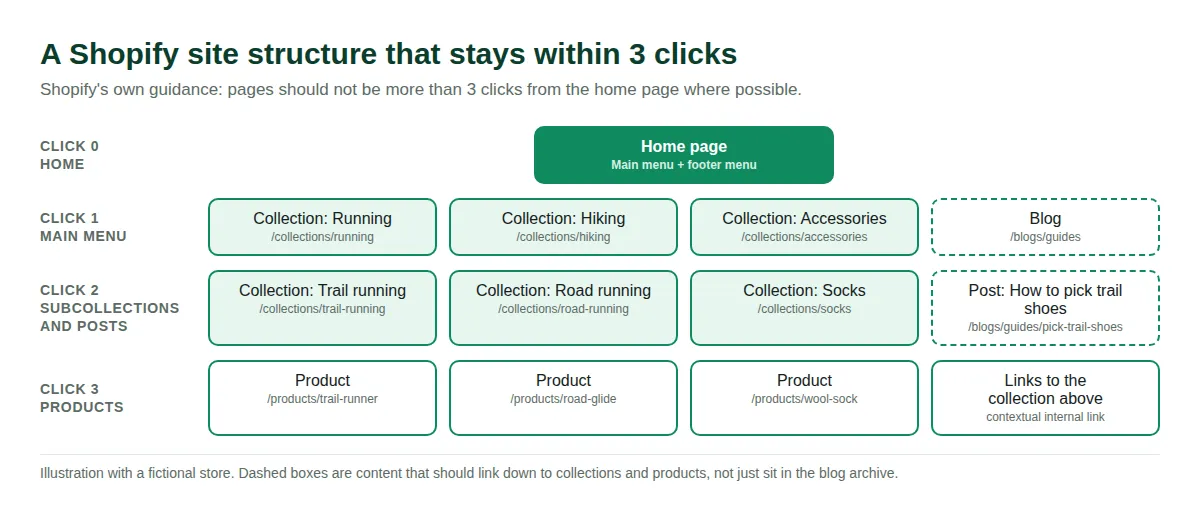
- Build hubs and spokes: A main collection links to its subcollections and best products, which link back up.
- Add contextual links: Link "pairs well with our merino trail socks" inside the description text.
- Link new posts from old ones: Find three older relevant pages whenever you publish.
- Find orphans and broken links: Crawl your store with a free crawler, compare against the sitemap, and fix 404s with updated links or redirects.
- Use real links: Plain
<a href>links are followed; JavaScript buttons may not be.
9. International SEO: Shopify Markets and hreflang
Per Shopify's international SEO documentation, hreflang tags, canonical URLs, sitemaps and crawler access are managed automatically from your market configuration, and translated pages are served at market-specific URLs.
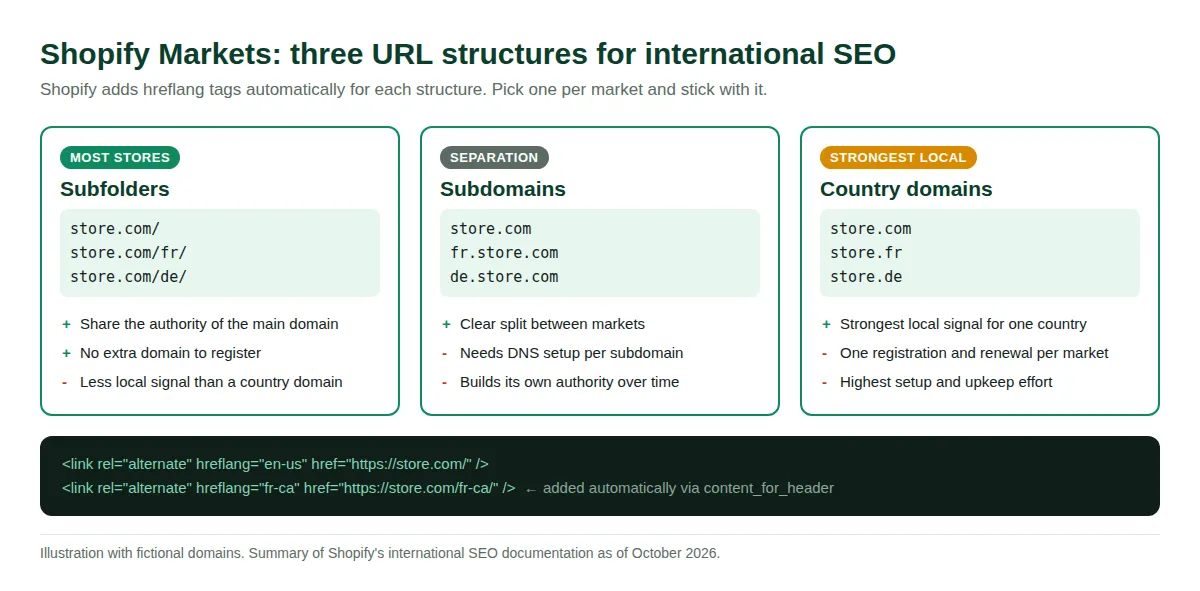
- Pick a structure: Subfolders (
store.com/fr/) share your main domain's authority and need no extra registration. Subdomains need DNS setup and build authority separately. Country domains give the strongest local signal but need a registration per market. For most small stores, subfolders are simplest (our assessment). - Leave automatic hreflang on: Shopify adds it through
content_for_headerand warns that turning it off can hurt SEO. Override only if your theme or an app already outputs hreflang. - Keep canonicals self-referencing: Each localized URL should name itself canonical. Google also requires hreflang tags to be reciprocal and fully qualified.
- Translate SEO fields and localize: Titles, descriptions, handles, alt text and collection copy, plus currency, sizing and shipping. Shopify notes that adapting beyond direct translation improves rankings.
10. Local SEO and backlinks
- Claim your Google Business Profile: If you have a store, pickup point or showroom, keep its details identical to your site.
- Create link-worthy assets: Original data, size and fit guides, calculators and buying guides earn links naturally.
- Pitch with a real story: A launch, an unusual material or a founder angle. Note that Google's link spam policy counts sending a product in exchange for a link as a violation unless the link is qualified.
- Qualify paid links: Google lists buying or selling links for ranking, excessive link exchanges, automated link generation and widely distributed footer links as link spam. Use
rel="sponsored"orrel="nofollow"on paid links. - Reclaim brand mentions: Search your brand name and ask sites that mention you to add a link.
For more ideas, see our guide to driving traffic to your Shopify store.
11. AEO and AI search: getting cited by AI answers
Answer engine optimization (AEO) means making pages easy for AI assistants and AI search features to find, understand and quote. Shopify's help center now has a page on optimizing your store for AI. Its advice mirrors classic SEO: clear product titles, price and availability shown prominently, high-quality images with alt text, and, for AI systems, detailed specifications, comparisons, structured data, and attributes like sizing, materials and care. It also lists a free Knowledge Base app for managing FAQs.
Google is direct about its AI features: there are no additional requirements to appear in AI Overviews or AI Mode, and no special optimization, schema or AI text files are needed. A page just has to be indexed and eligible to show with a snippet.
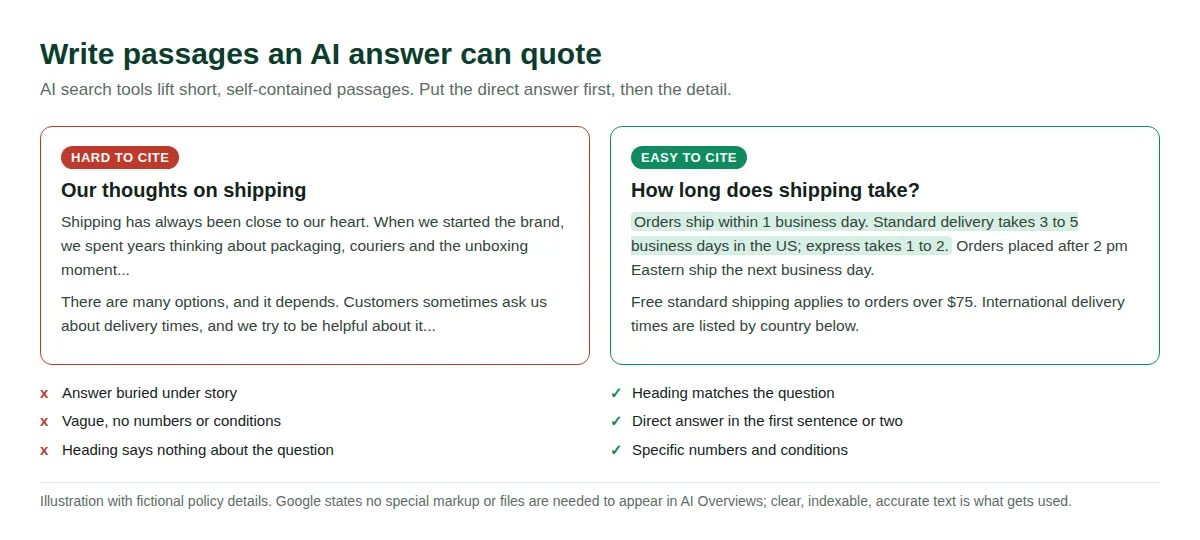
- Write answer-first passages: A heading that matches the question, a direct answer in the first sentence or two, then detail with specific numbers and conditions.
- Publish the facts assistants need: Shipping times, returns, warranty, sizing, materials and compatibility, in crawlable HTML text rather than images or PDFs.
- Add short FAQs: Real customer questions with factual answers, marked up only if visible on the page.
- Keep structured data accurate: Google says markup must match visible text.
- Allow crawling: Google's AI best practices include allowing crawling in robots.txt. Blocking other companies' AI crawlers means opting out of those assistants.
- Treat llms.txt as optional: As of October 2026 we found no Shopify Help Center page about llms.txt. Community members report Shopify serves a generated
/llms.txt, but that is from forum posts, so openyourstore.com/llms.txtto see what yours returns. Google says no special files are needed, and we found no evidence that llms.txt is a ranking factor. - Watch AI referrals in GA4: See which landing pages assistants send traffic to, and expand them. For context, see our piece on Shopify and ChatGPT.
12. Tracking and monthly maintenance
SEO is maintenance. Stores change constantly: products come and go, apps are added, themes update. Plan two to three hours a month for a small catalog.
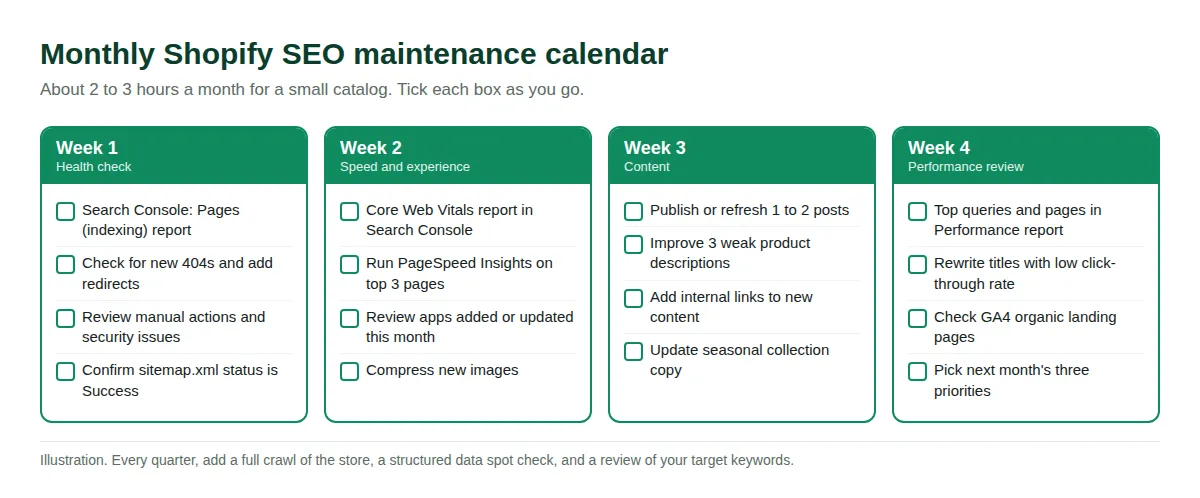
- Week 1, health: Review the Pages (indexing) report, new 404s and security issues, and confirm the sitemap status says Success. Add redirects.
- Week 2, speed: Check the Core Web Vitals report and Shopify's web performance report. Test your top three templates and review any app changes.
- Week 3, content: Publish or refresh one or two posts, improve three weak product descriptions, and add internal links.
- Week 4, review: Check top queries and pages, rewrite low click-through titles, review organic landing pages in GA4, and pick three priorities for next month.
- Quarterly and after changes: Run a full crawl, spot-check structured data, review your keyword map, and re-test one product, one collection and the home page after every theme or app change.
Recommended SEO tools
Every task here can be done with free tools. Paid tools mostly save time on large catalogs. Pricing changes, so check each vendor's page.
| Tool | Use it for | Cost model |
|---|---|---|
| Google Search Console | Indexing, queries, Core Web Vitals, URL Inspection | Free |
| Google Analytics 4 | Organic landing pages, conversions, AI referrals | Free |
| PageSpeed Insights | Lab and field speed data per URL | Free |
| Rich Results Test | Validating Product and review markup | Free |
| Bing Webmaster Tools | Bing indexing and search data | Free |
| Shopify web performance report | Real-user Core Web Vitals in admin | Included with Shopify |
| Site crawler (such as Screaming Frog SEO Spider) | Broken links, duplicate titles, orphan pages | Free tier with URL limit, paid for more |
| Shopify SEO apps | Bulk edits to titles, alt text and redirects | Varies, see each listing |
Also see how to keep your sitemap healthy in our Shopify sitemap guide.
FAQ
How long does Shopify SEO take to work?
Shopify says Google typically indexes new or updated pages within 48 to 72 hours. Ranking gains usually take longer, often a few months for new content or competitive keywords, and no one can guarantee a result. Compare progress against the baseline you recorded.
Is Shopify good for SEO?
Yes, with caveats. It handles sitemap.xml, robots.txt, canonical tags, SSL and product schema automatically. It also has fixed URL prefixes and duplicate collection-scoped product paths you must manage, and rankings still depend on content, links and speed.
Do I need an SEO app for Shopify?
No. You can edit titles, descriptions, alt text, handles and redirects in admin. An app helps with bulk edits, broken-link monitoring or structured data. Avoid running two apps that output the same markup.
Why is my Shopify store not showing up on Google?
Shopify's FAQ lists common causes: a new site still being indexed, password or private mode, a trial account (not indexed), missing redirects after a migration, or too little useful content. Use Search Console's Pages report and URL Inspection for the exact reason on a URL.
How do I check whether Google has indexed my pages?
Search site:yourstore.com for a quick view, or use URL Inspection in Search Console for a precise answer on one page. Shopify also recommends Google's URL inspection and rich results testing tools to see how pages render.
Should I edit robots.txt in Shopify?
Usually not. The default already blocks cart, checkout, account and filtered collection URLs. Shopify calls robots.txt.liquid customization unsupported and warns that mistakes can cost traffic. If you must, use Shopify's Liquid objects and compare the output first.
Does Shopify create duplicate content?
It can create several URLs for one product, but canonical tags tell search engines which to index. Verify one product with URL Inspection, link to canonical URLs, and do not use robots.txt to solve duplicates.
Does llms.txt help my store appear in AI answers?
Google says no special files are needed for its AI features, and we found no evidence llms.txt affects rankings or citations. Focus first on clear, crawlable, accurate pages with complete structured data.
Sources
- Shopify Help Center: SEO overview
- Shopify Help Center: Adding keywords for SEO
- Shopify Help Center: Optimizing your site structure
- Shopify Help Center: SEO FAQ
- Shopify Help Center: Optimizing your store for AI
- Shopify Help Center: Hiding a page from search engines
- Shopify Help Center: Editing robots.txt.liquid
- Shopify Help Center: Finding and submitting your sitemap
- Shopify Help Center: URL redirects
- Shopify Help Center: Google Analytics setup
- Shopify Help Center: Web performance reports
- Shopify Help Center: International SEO for markets
- shopify.dev: hreflang tags in your theme
- shopify.dev: structured_data filter
- shopify.dev: Theme performance best practices
- Google Search Central: Title links
- Google Search Central: Snippets and meta descriptions
- Google Search Central: Product structured data
- Google Search Central: Consolidate duplicate URLs
- Google Search Central: hreflang and localized versions
- Google Search Central: AI features and your website
- Google Search Central: Spam policies
- web.dev: Core Web Vitals