
Shopify vs Lightspeed (2026): Which Fits Your Store?

This article may contain affiliate links. We may earn a commission at no extra cost to you. How we earn money

In this article
Choose Shopify if you sell online and in a store. Choose Lightspeed if you sell mostly in person, want detailed stock tools, or run a restaurant or golf course. As of November 2026, Shopify starts at $19 a month billed yearly, or $108 with POS Pro for in-store selling. Lightspeed Retail starts at $89 a month on its annual toggle.
Below, we put Shopify vs Lightspeed side by side on eight factors, from pricing to hardware.
1. Shopify vs Lightspeed: A Quick Glance
1.1. An Overview of Shopify vs Lightspeed
 |  | |
| Definition | An ecommerce platform with a built-in point of sale for selling online and in person. | A point-of-sale platform with built-in ecommerce. |
| Plan prices (US, as of November 2026) | Basic $19, Grow $49 and Advanced $299 a month billed yearly. Plus from $2,300 a month. | Basic $89, Core $149 and Plus $289 a month on the annual toggle, with one register included. |
| In-store selling | Casual in-person selling is included in every plan. POS Pro adds $89 per location per month, billed yearly. | Extra locations and registers cost more. Multi-location businesses can ask for a custom plan. |
| Support | Live chat 24/7 on every plan. Phone comes with Plus, Retail or POS Pro. | 24/7 chat on all three Retail plans. 24/7 phone on Plus only. |
| Online store | Full ecommerce platform with thousands of apps. | Built-in ecommerce. The Basic plan’s version is labeled Basic. |
| Industry products | Retail and online selling, with a page for golf stores. | Lightspeed Restaurant and Lightspeed Golf products. |
The Shopify prices in this table come from its pricing page.
1.2. The key difference between Shopify vs Lightspeed
Shopify starts with the online store and adds a point of sale for each location. Its POS page describes cloud-based software that combines in-store and online selling, with one central back office.
Lightspeed starts at the counter. Its Retail plans include inventory tools on every plan, with loyalty and advanced reports on Core and Plus.
2. Shopify vs Lightspeed: an honest, head-to-head comparison
2.1. POS software pricing
First, what each platform costs.
| ❗ Important: Shopify and Lightspeed both offer varied prices based on different countries and the pricing information we use below is for the US only. Therefore, you should use it for reference only. |
2.1.1. Shopify
As of November 2026, Shopify has four plans for US stores. Prices are per month, billed yearly, with the monthly-billing price in brackets:
- Basic: $19 ($25 billed monthly), suitable for small businesses just starting out.
- Grow: $49 ($65 billed monthly), offering more features for growing businesses.
- Advanced: $299 ($399 billed monthly), for larger businesses needing advanced features.
- Shopify Plus: from $2,300 a month, for enterprises with custom requirements.
Casual in-person selling is included in every plan. It covers limited staff POS access, simple customer profiles and returns at the original purchase location. Shopify’s POS page no longer lists a separate POS Lite plan.
For more than casual selling, POS Pro adds $89 per location per month, billed yearly. Each extra location that needs POS Pro costs another $89 a month.
2.1.2. Lightspeed
Lightspeed Retail has three plans for US stores, each with one register included. Prices are per month on the annual toggle (save up to 18%):
- Basic: $89, for essential day-to-day needs of independent retailers, with built-in ecommerce labeled Basic.
- Core: $149, with management tools for growing retailers and built-in ecommerce.
- Plus: $289, for established retail operations that need advanced customization and room to scale.
Monthly billing costs more. Extra locations and additional registers cost more too. The page does not show those amounts, and it says prices can vary by business and industry. Multi-location businesses can ask Lightspeed for a custom plan.
Loyalty, advanced sales, staff and inventory reports, and accounting, ecommerce and marketing integrations come with Core and Plus, not Basic.
Our verdict: Shopify costs less when you sell online and in a shop. Shopify Basic plus POS Pro is $108 a month on yearly billing, against $149 for Lightspeed Core, which includes built-in ecommerce. For a counter-only shop, Lightspeed Basic ($89) costs less than Shopify Basic plus POS Pro ($108), but Basic leaves out loyalty, advanced reports and integrations.
2.2. Ease of use
Next is ease of use: how fast you can get the basic jobs done.
2.2.1. Shopify
In our view, Shopify is the easier of the two to start with. Shopify describes its platform as one admin to build a storefront without coding, manage products and inventory, process orders and sell in person.
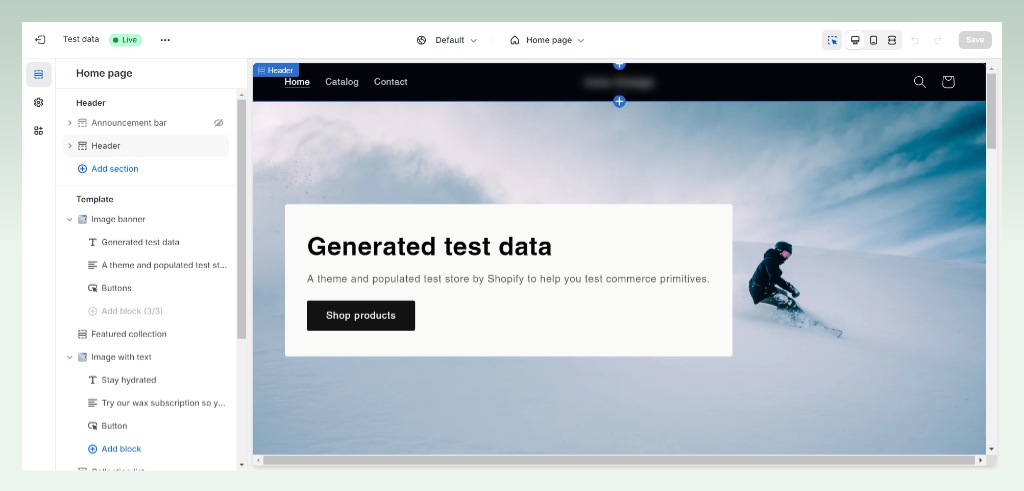
Shopify POS runs from the same admin as your online store. Its POS pages describe one dashboard for sales, staff and customers.
2.2.2. Lightspeed
Lightspeed Retail is built around the counter. Inventory tools sit inside the POS on every plan, and loyalty and advanced reports come with Core and Plus. We have not run a usability test of either product, so watch a demo of each before you choose.
Our verdict: In our view, Shopify is the simpler start if you also sell online, because one admin covers the shop and the online store. For a counter-only business the gap is small.
2.3. Support
Next, support: what help you get when something breaks.
2.3.1. Shopify
Shopify’s Help Center says live chat is available 24/7 on every plan. Email support is for Plus and Retail, and phone support comes with Plus, Retail or POS Pro.
2.3.2. Lightspeed
Lightspeed’s Retail pricing page shows 24/7 chat on all three plans. 24/7 phone support is on Plus ($289) only.
Our verdict: Both give you 24/7 chat on every plan. If you want a phone line, Shopify gets you there at $108 a month (Basic plus POS Pro), while Lightspeed needs Plus at $289.
2.4. Key eCommerce & POS features
Next, the ecommerce and POS features each platform includes.
2.4.1. Shopify
Shopify’s ecommerce features include:
- Store setup and design: Build a storefront without coding.
- Product management: Manage products and inventory from one admin.
- Payment processing: Shopify offers its own payment processing, Shopify Payments, and supports third-party gateways.
- International commerce: Show prices in local currencies and localize selling with Shopify Markets.
- Multi-channel selling: Sell on social channels and marketplaces besides your POS.
- Apps and marketing tools: Extend your store with thousands of apps.
POS features on Shopify’s POS pages:
- In-store sales: Casual in-person selling comes with every paid plan, and POS Pro adds the advanced feature set.
- Reporting and analytics: POS Pro adds in-depth inventory reporting and lifetime value reporting.
- Multi-location support: One centralized back office for all locations.
2.4.2. Lightspeed
Lightspeed Retail includes built-in ecommerce, labeled Basic on the Basic plan. Its pricing page shows:
- Product management: Products, variants and stock are handled across channels from one inventory.
- Payment processing: Lightspeed Payments sits inside the POS, with a card-present rate of 1.5% on all three Retail plans.
- Integrations: Accounting, ecommerce and marketing integrations come with Core and Plus.
POS features:
- In-store sales: Retail POS with one register included and integrated payments.
- Purchase orders: Create and manage purchase orders from the POS.
- Reporting and analytics: Advanced sales, staff and inventory reports come with Core and Plus.
- Multi-location support: Extra locations are available at an added monthly cost.
- Industry products: Lightspeed sells Lightspeed Restaurant and Lightspeed Golf.
Our verdict: It is a tie. Shopify has the wider ecommerce toolkit, with thousands of apps and local currencies through Shopify Markets. Lightspeed builds inventory tools into the POS on every plan, with loyalty and advanced reports on Core and Plus. Choose by where most of your sales happen.
2.5. Location management
Next, location management, for shops with more than one store.
2.5.1. Shopify
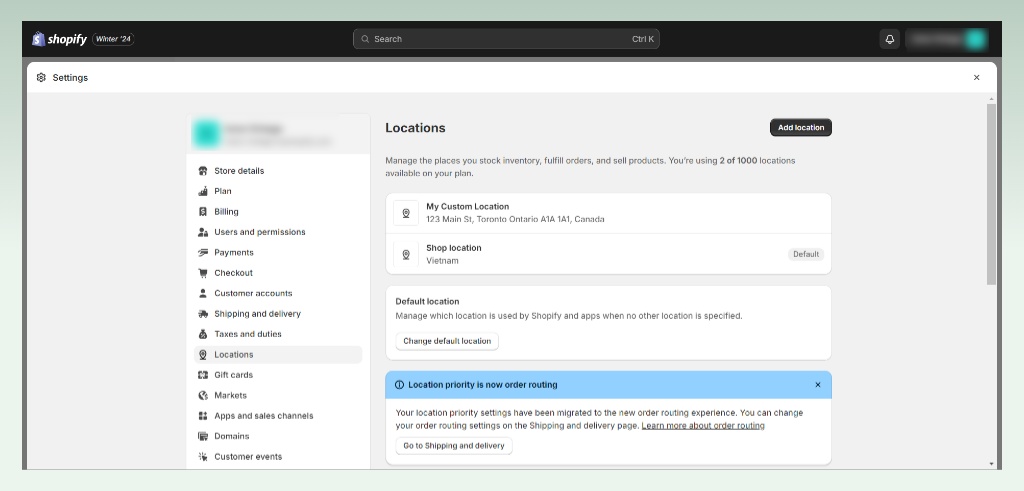
Shopify runs every location from one centralized back office. POS Pro is priced per location, so each location that needs the full feature set adds $89 a month. Its POS pages describe:
- Real-time monitoring of your stores from a central location, with insights across the whole business
- Returns at any location on POS Pro, and at the original purchase location on casual selling
2.5.2. Lightspeed
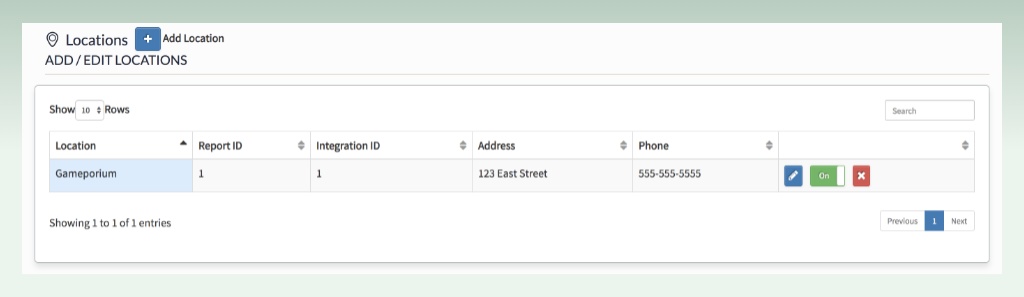
Lightspeed Retail’s pricing and product pages cover multi-location selling:
- Extra locations are an added monthly cost on top of the base plan
- Transfer inventory between locations and order stock for any location
- Customer profiles and sales histories follow shoppers from location to location and channel to channel
- Reports that spot trends across locations
Our verdict: Pick Shopify if you add locations one at a time and want a published price for each: POS Pro is $89 per location per month. Pick Lightspeed if you want a custom plan for several stores, and ask for a quote first, because Lightspeed does not publish its extra-location prices.
2.6. Inventory management
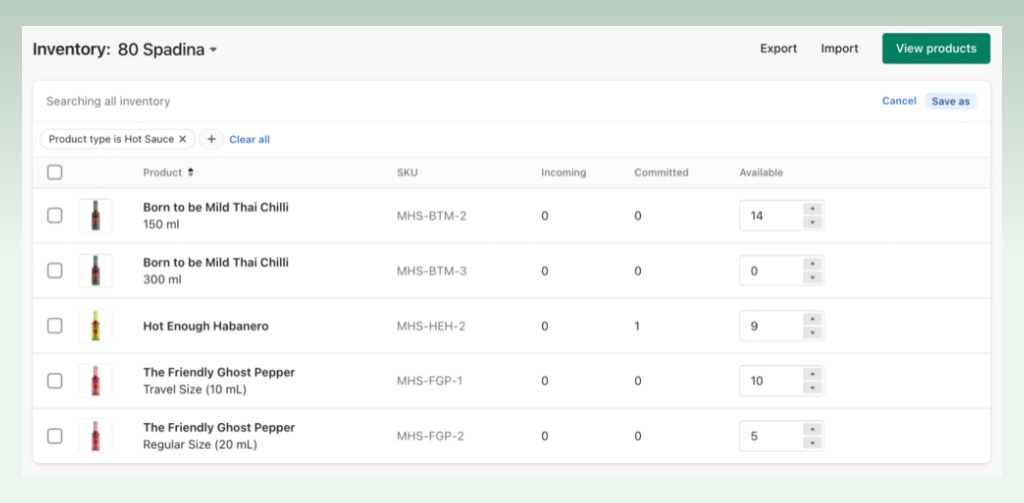
2.6.1. Shopify
Shopify POS Pro adds these inventory tools:
- Inventory counts, purchase orders and low stock alerts from a single place
- Stock transfers and faster workflows for exchanges and in-store pickups
- In-depth inventory reporting for product performance
2.6.2. Lightspeed
Lightspeed Retail includes these inventory tools:
- Products, variants and stock across all channels
- Transfers between locations, and ordering for any location
- Tools to track shrink and discrepancies
- Advanced sales, staff and inventory reports on Core and Plus
- Wholesale ordering on every plan, and landed costs on Core and Plus
Our verdict: Both cover purchase orders and stock transfers. Pick Lightspeed if you buy from many brands: wholesale ordering comes with every plan and landed costs with Core and Plus. Pick Shopify if you want online and in-store stock in one admin, with counts and low stock alerts in POS Pro.
2.7. Customer management
2.7.1. Shopify
Every paid Shopify plan includes simple customer profiles. POS Pro adds rich customer profiles, captured in store and online, with lifetime value reporting and loyalty insights inside the POS.
In short, Shopify offers:
- Simple customer profiles on every paid plan
- Rich profiles, lifetime value reporting and loyalty insights on POS Pro
- Customer segments, as the Shopify pricing page describes
2.7.2. Lightspeed
Lightspeed Retail offers these customer tools:
- Built-in loyalty programs connected to customer accounts, in store and online (Core and Plus)
- Customer segments based on data
- Marketing automation and communication on all channels
- Customer profiles and sales histories that follow shoppers between locations and channels
Our verdict: Lightspeed offers loyalty programs on Core and Plus, not on Basic. Shopify POS Pro offers loyalty insights. Pick Lightspeed if a built-in loyalty program is central and Core ($149) fits your budget. Pick Shopify if you want rich customer profiles with lifetime value across the shop and online, which POS Pro includes.
2.8. POS hardware
Last, hardware: what you can plug into each system. As of November 2026, neither hardware page shows prices. Shopify’s says costs vary with your setup, and Lightspeed’s shows none, so ask each for a quote.
2.8.1. Shopify
Shopify’s hardware page groups its hardware by where you sell:
- At pop-ups and events: Tap to Pay turns a smartphone into a checkout.
- On the sales floor: A complete POS device to look up inventory and serve customers anywhere in the store.
- At the counter: A full countertop checkout with a card reader, barcode scanner and receipt printer. POS Hub connects the peripherals to your tablet.
2.8.2. Lightspeed
Lightspeed Retail sells hardware as kits and as single items. Its hardware page shows:
- iPad hardware kit: LAN receipt printer, cash drawer, Bluetooth scanner and Lightspeed iPad stand. The iPad and payment terminal are not included.
- Desktop hardware kit: USB receipt printer, cash drawer and USB scanner.
- Restaurant hardware: Lightspeed Restaurant has a kitchen printer and a kitchen display system.
Our verdict: Pick Shopify if you also sell at pop-ups or events, because Tap to Pay turns a smartphone into a checkout. Pick Lightspeed if you want a ready-made kit with printer, cash drawer and scanner, or kitchen hardware for a restaurant. For a plain retail counter the two are close, so compare the quotes.
3. Our final verdict: Shopify vs Lightspeed
Here is the short version.
| | |
| Pros | + Online store and POS share one back office + Thousands of apps to extend your store + Entry price from $19 a month billed yearly + Live chat 24/7 on every plan | + Lightspeed Restaurant and Lightspeed Golf products + Inventory and purchase orders on every plan; loyalty and advanced reports on Core and Plus + 24/7 chat on every plan, 24/7 phone on Plus |
| Cons | • POS Pro costs $89 per location per month • Phone support only with Plus, Retail or POS Pro | • Entry price of $89 a month with one register, and Basic leaves out loyalty, advanced reports and integrations • Extra locations and registers cost more • Phone support only on Plus, and the iPad and payment terminal are not in the hardware kits |
Choose Shopify when:
- Online sales matter as much as the shop, and you want one back office for both.
- You want to start from $19 a month billed yearly, and POS Pro at $89 per location fits your budget.
Choose Lightspeed when:
- Most of your sales happen in person.
- You run a restaurant or golf course and want Lightspeed’s product for it.
- Your shop is counter-only, and Lightspeed Basic ($89) costs less than Shopify Basic plus POS Pro ($108), though Basic leaves out loyalty, advanced reports and integrations.
4. The bottom line
Count your locations and registers, then check whether you sell online. Price that setup on both sites before you commit. Shopify shows POS Pro and casual selling on one page.
If you are into eCommerce platform comparison articles like this, explore our unbiased eCommerce comparison topics for more relevant insights.
Also, check out eComStart.io to get yourself updated with all things eCommerce.
5. FAQs


