Shopify POS vs Clover: Which Fits Your Store?

This article may contain affiliate links. We may earn a commission at no extra cost to you. How we earn money

In this article
Shopify vs Clover comes down to where you sell. Choose Shopify POS if you already run a Shopify online store and want one inventory in both places. Choose Clover if a counter, restaurant or service shop is the business. Shopify POS starts at $19 a month with yearly billing (US, USD, as of October 2026).
Quick verdict
Choose Shopify POS if you sell online and in person from one catalog. From $19 a month on the Basic plan with yearly billing, or $25 month to month. POS Pro adds $89 a month per location (Shopify pricing pages, as of October 2026).
Skip it if you run table service. The Shopify POS pages checked for this post do not list table service tools. Clover’s plan docs do.
Discover Shopify POS paid link
Choose Clover if the counter is the business, for example a restaurant or a service shop that wants Clover’s own devices. Retail systems start at $16 a month for 36 months, or $349 upfront (the page lists no separate Starter fee; Clover’s retail pricing page, US, checked October 16, 2026).
Skip it if a Shopify store is your main channel. In Clover’s developer docs the Shopify link is a payments plugin. Inventory sync needs a third-party app.
We earn a commission if you buy through links on this page. It does not change what we recommend.
Key takeaways
- Shopify POS: Basic is $19 a month with yearly billing or $25 month to month. Casual in-person selling is in every paid plan. POS Pro adds $89 a month per location.
- Staff roles and permissions on Shopify need POS Pro or the Plus plan. The pricing pages disagree on how many staff can log in without it.
- Clover plans are named by job: Payments, Essentials (also called Register Lite), Register, Counter Service Restaurant and Table Service Restaurant.
- Clover and Shopify connect in two ways: a free Clover payments plugin for Shopify online stores (US and Canada), and third-party inventory apps such as SKU IQ ($19 to $99 a month on its listing).
- Clover retail systems are sold on a 36-month term: $16, $180 or $240 a month, or hardware upfront plus a monthly software fee. In-person card rates are 2.6% or 2.3% + 10 cents (Clover retail pricing page, October 2026). Shopify’s in-person rates were not readable, so card fees are not ranked.
How we compared Shopify POS and Clover
This comparison uses public pages only: pricing pages, the Shopify hardware store, Shopify and Clover help and developer docs, and one Shopify App Store listing. We did not open paid accounts. All prices are US dollars from US pages.
- Monthly software cost (Shopify pricing pages, Clover plan docs)
- Hardware (Shopify hardware store list prices, Clover device list in the plan docs)
- Payment processing (Shopify pricing page fees, Clover docs)
- Online store integration (Clover developer docs, Shopify App Store listing)
- Inventory (Shopify Help Center, Clover plan docs)
- Staff permissions (Shopify pricing pages)
- Support (Shopify pricing page)
Clover’s pricing pages render in a browser, so those figures come from a rendered copy of the US pages. Not checked: Shopify’s in-person card rates, staff limits and support options for Clover, and ease of use. No public page measures ease of use, so this post does not score it.
Checked: October 16, 2026.
Shopify POS vs Clover at a glance
| Criterion | Shopify POS | Clover | Better for |
|---|---|---|---|
| Monthly software | Basic $19 (yearly) or $25; Grow $49 or $65; POS Pro +$89 per location | Retail: Basic $16, Standard $180, Advanced $240 a month for 36 months, or $349 / $1,899 + $84.95 / $2,648 + $104.90 a month upfront (hardware included) | Open: different bundles, compare written quotes |
| Plan structure | One plan plus optional POS Pro | Payments, Essentials, Register, Counter Service Restaurant, Table Service Restaurant | Clover for restaurants |
| Hardware list prices | POS Terminal $349, tablet stand $149, receipt printer $289, scanner $209 | Bundled in the retail systems above: compact terminal, Station Duo, Flex handheld; kitchen printer and scales listed in the plan docs | Open for retail; Clover if you need a kitchen printer |
| Payment processing | Shopify Payments; 2%, 1% or 0.6% fee on third-party providers (Basic, Grow, Advanced) | Retail card present: 2.6% + 10 cents (Basic), 2.3% + 10 cents (Standard, Advanced); typed in: 3.5% + 10 cents | Open: Shopify’s in-person rates not readable |
| Online store | Included in every plan | No built-in Shopify sync in the docs checked; payments plugin only | Shopify POS |
| Inventory | POS and Shopify admin track one inventory | Simple (Essentials) or enhanced with variants (Register) | Shopify POS if you sell online |
| Staff permissions | Roles and permissions need POS Pro or Plus | Limits per plan not published on pages checked | Shopify (published terms only) |
| Support | Live chat 24/7 on Basic and Grow; enhanced chat on Advanced | Not published on pages checked | Shopify (published terms only) |
| Free trial | 3 days free, then $1 a month for 3 months | Promo: no software fees for a 90-day trial of Essentials or Services Growth, selected business types, 3/5/2026 to 12/31/2026 | Open: Clover’s offer is time-limited and not for every type |
| Weakness | POS Pro cost repeats for every location | 36-month term on hardware plans; online store sync depends on an extra app; plugin covers US and Canada only | Check before you buy |
How much do Shopify POS and Clover cost?
Shopify POS plans and POS Pro
Shopify POS is part of every paid Shopify plan. Casual in-person selling is included. POS Pro is an add-on for permanent retail locations: $89 a month per location, billed yearly according to Shopify’s POS FAQ. For the full split between the two tiers, read our guide to Shopify POS Lite vs POS Pro.
| Plan | Monthly | Yearly (per month) | Main limit |
|---|---|---|---|
| Basic | $25 | $19 | No additional staff accounts; limited staff on POS |
| Grow | $65 | $49 | 5 additional staff accounts |
| Advanced | $399 | $299 | 15 additional staff accounts |
| Plus | From $2,300 | Not listed | 3-year term shown on the POS page |
| POS Pro add-on | $89 per location | Billed yearly | Needed for staff roles and permissions on Basic to Advanced |
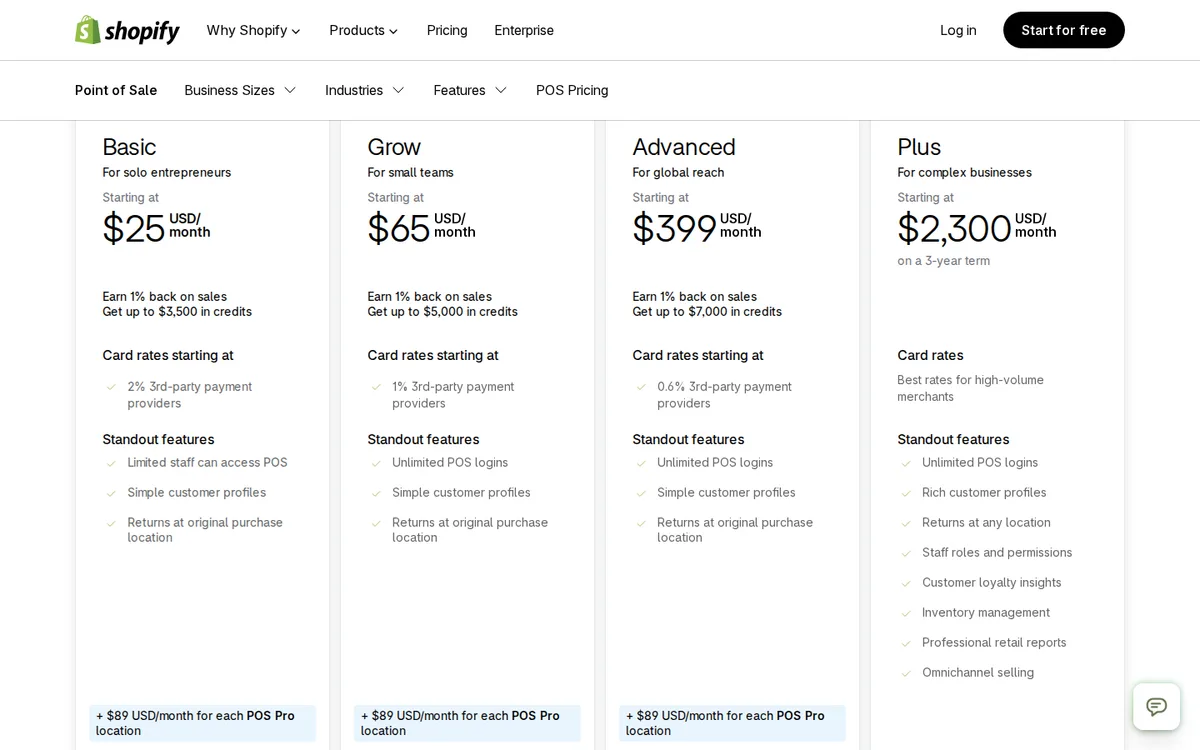
Hardware is extra. Shopify’s hardware store lists a POS Terminal at $349, a tablet stand at $149, a receipt printer at $289 and a barcode scanner at $209 (US, checked October 2026). The POS pricing FAQ says you need a smartphone or tablet and a Shopify card reader to start.
paid link The button above is a tracked link. For the plans behind the POS, see our breakdown of Shopify pricing plans.
Clover plans and hardware
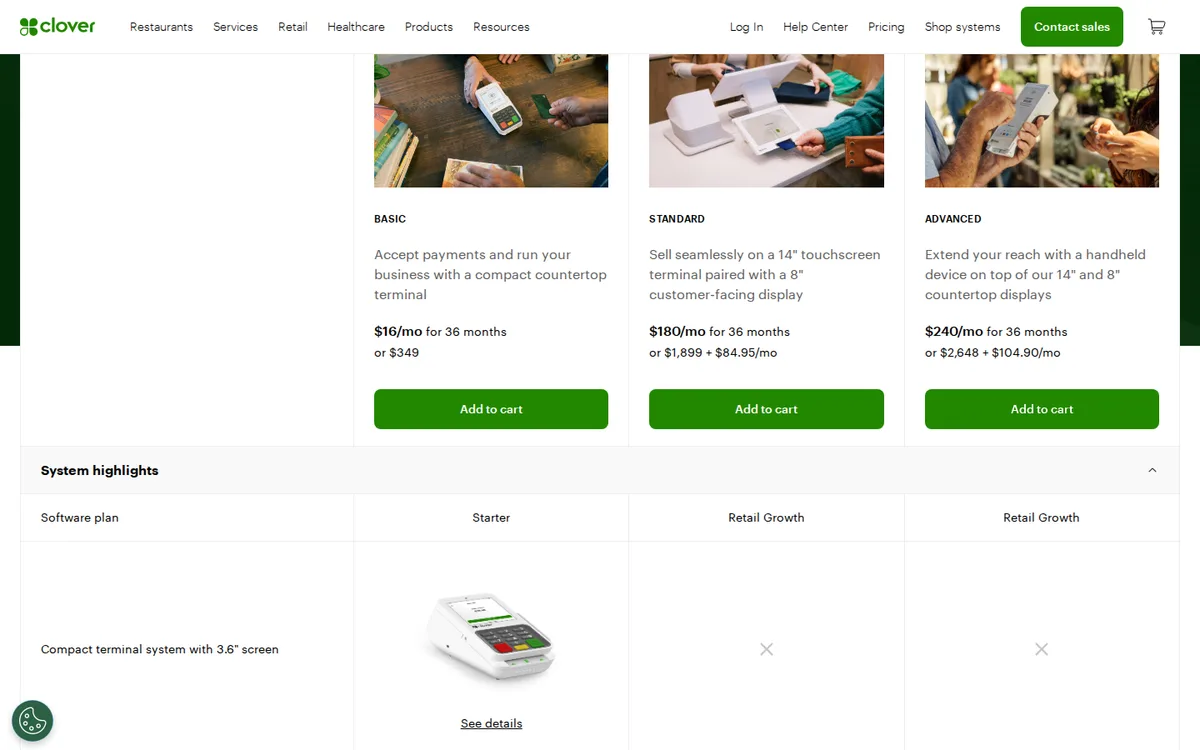
Clover sells hardware and software together, priced by business type. Its US pricing hub says prices are shown only on Clover.com and sends you to one page per type. The retail page lists three systems, each as a 36-month monthly payment or as hardware upfront plus a monthly software fee (checked October 16, 2026, US). Contract terms apply: the page says “for 36 months”.
| Retail system | Hardware | Monthly, 36 months | Or upfront + monthly | Card present / typed in |
|---|---|---|---|---|
| Basic (Starter software) | Compact countertop terminal with built-in printer; no cash drawer | $16 | $349 | 2.6% + 10 cents / 3.5% + 10 cents |
| Standard (Retail Growth) | Station Duo, 14″ screen plus 8″ customer display | $180 | $1,899 + $84.95 | 2.3% + 10 cents / 3.5% + 10 cents |
| Advanced (Retail Growth) | Station Duo plus Flex handheld | $240 | $2,648 + $104.90 | 2.3% + 10 cents / 3.5% + 10 cents |
Restaurants pay more. On Clover’s pages (US, October 16, 2026), full-service dining is $179, $239 or $354 a month for 36 months, and quick service is $135, $185 or $245. Card rates for restaurants were not captured. Clover’s hub page also advertises a $450 statement credit on Station, Mini or Flex for new merchants, online only, and says the offer expires December 31, 2026.
Clover’s developer docs name the software plans differently: Payments, Essentials (Register Lite), Register, Counter Service Restaurant and Table Service Restaurant. The two naming schemes are not mapped to each other on the pages checked.
| Plan | What Clover’s docs say | Devices listed |
|---|---|---|
| Payments (Payments Plus) | Entry-level plan for cloud-based payments, employee and customer management | Mini, Flex, or no device |
| Essentials (Register Lite) | Cash register replacement with simple inventory and order management | Mini, Flex, or no device |
| Register | Full-featured POS with enhanced inventory, modifiers and variants | Station Duo, Station Solo, Station 2018, Mini, Flex, kitchen printer, weight scales |
| Counter Service Restaurant | Item modifiers, bar tabs and menu management | Same as Register |
| Table Service Restaurant | Table mapping, table-side ordering and firing | Same as Register |
Worked example: one counter, one handheld
Hypothetical store, one location. Assumptions: you own a tablet; the counter uses a POS Terminal, a stand, a receipt printer and a scanner; the handheld is a second POS Terminal; Grow plan; POS Pro on the one location; list prices from October 2026.
| Cost line | Arithmetic | First year |
|---|---|---|
| Grow plan, yearly billing | $49 x 12 | $588 |
| POS Pro, one location | $89 x 12 | $1,068 |
| Counter hardware | $349 + $149 + $289 + $209 | $996 |
| Handheld terminal | $349 | $349 |
| Total before card fees | $588 + $1,068 + $996 + $349 | $3,001 |
That is about $250 a month over the first year. On month-to-month billing the Grow line is $65 x 12 = $780, so the total is $3,193.
For Clover, take the Advanced retail system from the table above: a Station Duo at the counter plus a Flex handheld (US, checked October 16, 2026).
| Option | Arithmetic | First year | 36 months |
|---|---|---|---|
| Clover Advanced, 36-month payment | $240 x 12; $240 x 36 | $2,880 | $8,640 |
| Clover Advanced, hardware upfront | $2,648 + $104.90 x 12; $2,648 + $104.90 x 36 | $3,906.80 | $6,424.40 |
| Shopify Grow + POS Pro + terminals | ($49 + $89) x 12 + $1,345; ($49 + $89) x 36 + $1,345 | $3,001 | $6,313 |
Treat the gap as a rough guide. The devices differ, Clover’s Retail Growth software and Shopify Grow (which includes the online store) are not the same product, and card fees are left out. Shopify’s in-person card rates were not readable in this check.
Does Clover work with Shopify?
Partly. Clover publishes a free payments plugin for Shopify online stores, but its developer docs describe payments only. To keep inventory in step, you need a third-party app.
Clover Payments plugin for Shopify
Clover’s docs say the plugin lets a Shopify online shop in the US or Canada take payments through an existing Clover merchant account. The plugin is free; transactions are charged under your Clover account agreement. Setup runs from Shopify under Settings, Payments, Choose a provider. Clover lists these limits: one Shopify shop connects to one Clover merchant ID, merchant IDs with surcharging cannot connect, and you should void orders in Shopify because the plugin is not two-way compatible.
Shopify’s pricing page says a third-party transaction fee may apply when you use a provider other than Shopify Payments: 2% on Basic, 1% on Grow, 0.6% on Advanced. The pages checked do not say whether that fee applies to Clover Payments. Ask Shopify before you rely on it.
Inventory sync with SKU IQ
The Shopify App Store lists SKU IQ for TikTok Shop or POS, by o2oCommerce Inc., with Clover under “Works with”. As listed on the Shopify App Store (checked October 2026) it has 4.0 stars from 125 reviews and a 14-day free trial on paid plans. It syncs inventory, orders, prices and product details. A Clover blog post names SKU IQ in Clover’s app market as a way to connect Clover POS to ecommerce platforms (its example store runs WooCommerce).
| SKU IQ plan | Monthly | Main limit |
|---|---|---|
| Add-On | Free | For stores that already have SKU IQ on the POS side |
| Basic | $19 | Syncs quantities only |
| Plus | $49 | Syncs most product attributes |
| Pro | $99 | Syncs all attributes and images |
Reviews are mixed. One 2025 review reports disconnections and wrong quantities; the developer replied that a token issue was fixed in June 2025. Treat any sync as a second subscription and a second point of failure.
Which POS keeps online and in-store inventory in sync?
Shopify POS does, inside the same admin. Shopify’s Help Center says POS syncs with your Shopify admin to track orders and inventory across locations and sales channels. Clover tracks inventory inside Clover: simple inventory on Essentials, enhanced inventory with variants on Register. Linking it to a Shopify store needs an app such as SKU IQ.
Better for online plus in-store stock: Shopify POS.
How do payments and fees compare?
Shopify’s POS page offers Shopify Payments out of the box and adds a 2%, 1% or 0.6% fee when you use a third-party provider on Basic, Grow or Advanced. Clover’s retail pricing page lists 2.6% + 10 cents for tapped, swiped or inserted cards on Basic, 2.3% + 10 cents on Standard and Advanced, and 3.5% + 10 cents for typed-in cards on all three (US, October 16, 2026). Its pricing hub says rates start as low as 2.3% + 10 cents. Shopify’s in-person card rates were not on the pages opened for this check, so compare them on Shopify’s own page.
Before you sign, ask each vendor for a written rate for card-present, keyed-in and online payments, plus any fee for faster deposits. Better for: open until you have both quotes.
Which POS hardware do you need?
Shopify runs on your own phone or tablet plus a card reader, and you add stands, printers and scanners as needed (prices above). Clover sells its own devices. Its retail page pairs Basic with a compact countertop terminal that has a 3.6″ screen and a built-in printer (no cash drawer), Standard with a Station Duo (14″ touchscreen plus 8″ customer display) and Advanced with a Station Duo and a Flex handheld. Its POS systems page also lists Compact, Flex Pocket, Flex, Mini, Station Solo, Station Duo and Kiosk. The plan docs add a kitchen printer and weight scales for the Register and restaurant plans.
If you are offered used Clover hardware, ask which generation it is. Clover’s developer docs list Gen 1 devices (Station C010, Mobile, Mini C030 and C031, Flex C041 and C042) under an end-of-app-update notice; the page gives March 30, 2026 in its heading and May 15, 2026 in its text.
Better for: Clover if you need a kitchen printer or scales; open for a plain retail counter.
How do staff accounts and permissions compare?
Shopify has two separate limits. Admin staff accounts: none listed on Basic, 5 on Grow, 15 on Advanced, unlimited on Plus. POS access is where Shopify’s own page is inconsistent. The Grow and Advanced cards on the POS pricing page list “Unlimited POS logins”, while the casual in-person list included in every plan says “Limited staff can access POS”. Only POS Pro lists “Unlimited staff can access POS” and “Staff roles and permissions”. If roles matter, plan on POS Pro at $89 a month per location.
Clover’s plan docs list employee management even in the entry-level Payments plan. The pages checked do not publish staff limits or permission levels per plan, so ask Clover in writing. Better for: Shopify, because its rule is published, even if inconsistent in one place.
How do support options compare?
Shopify’s pricing page lists 24/7 live chat on Basic and Grow, enhanced live chat on Advanced and priority 24/7 phone support on Plus. Clover’s support channels and hours are not published on the pages checked. Better for: Shopify, on published terms only.
Which one should you pick?
- Retail with an online store: Shopify POS. One catalog, one admin, and no sync app. Read the roundup of Shopify POS reviews before you commit.
- Restaurant or service counter: Clover. It has counter service and table service plans and a kitchen printer in its device list. Quick service starts at $135 a month and full service at $179 a month, each for 36 months (US, October 16, 2026). Shopify’s POS pages checked do not list table service.
- Several locations: Shopify POS lists support for 1,000+ locations, with $89 a month for each POS Pro location. Clover’s multi-location terms are not published on the pages checked.
- Already on Clover, adding an online store: keep Clover and add a Shopify store with the Clover Payments plugin, or move the counter to Shopify POS. Price both against SKU IQ at $19 to $99 a month.
Neither fits? Compare Shopify and Lightspeed or browse our list of the best POS systems for small business.
Discover Shopify POS paid link
FAQ
Sources
- Shopify pricing page, shopify.com/pricing (US, checked October 16, 2026)
- Shopify POS pricing page, shopify.com/pos/pricing (US, checked October 16, 2026)
- Shopify POS payments page, shopify.com/pos/payments (checked October 16, 2026)
- Shopify hardware store, hardware.shopify.com (US, checked October 16, 2026)
- Shopify Help Center: Shopify POS (checked October 16, 2026)
- Shopify Help Center: tracking and adjusting POS inventory (checked October 16, 2026)
- SKU IQ listing on the Shopify App Store (checked October 16, 2026)
- Clover developer docs: merchant service plans (checked October 16, 2026)
- Clover developer docs: Clover Payments plugin for Shopify Online Shop (checked October 16, 2026)
- Clover developer docs: integrate the plugin with Shopify (checked October 16, 2026)
- Clover Blog: inventory edition (checked October 16, 2026)
- Clover retail pricing (rendered in a browser, US, checked October 16, 2026)
- Clover full-service restaurant pricing (rendered in a browser, US, checked October 16, 2026)
- Clover quick-service restaurant pricing (rendered in a browser, US, checked October 16, 2026)
- Clover pricing hub (rendered in a browser, US, checked October 16, 2026; promo terms)
- Clover POS systems page (rendered in a browser, US, checked October 16, 2026; device list)